HID 2K iCLASS Card
Product documentation menu
Legacy HID iCLASS 2k cards for writing a captured iCLASS Legacy, iCLASS SE, iCLASS SR or iCLASS Seos credential, or the credential read out of a MIFARE DESFire EV1 or DESFire EV3 card carrying an SIO, for a downgrade.
Legacy HID iCLASS 2k cards: what a captured iCLASS Legacy, iCLASS SE, iCLASS SR, iCLASS Seos, or DESFire EV1 or EV3 with SIO credential is written to for a downgrade.
| Card | HID iCLASS 2k, legacy |
| Takes a credential captured from | iCLASS Legacy, iCLASS SE, iCLASS SR, iCLASS Seos, MIFARE DESFire EV1 with SIO, MIFARE DESFire EV3 with SIO |
| Used for | A downgrade attack |
| Written with | A Proxmark or an ATLAS Chameleon Ultra |
Replacing every reader and every card on a campus at once is expensive, and done in one move it can lock people out. So a site that moved to a newer credential often bought readers that still accept legacy iCLASS, to carry the old cards through the migration. The reader only processes the card and passes the same bits to the controller, and the controller decides. It does not know which technology the bits arrived on.
That is the downgrade. A PPE reader captures the bit length, facility code and card number the newer credential carries, and those numbers are written to a legacy iCLASS 2k card. Where the site’s readers have legacy support enabled, the 2k card opens the door.
What is captured and downgraded to it
| Credential | Captured with |
|---|---|
| iCLASS Legacy | The HID iCLASS R90SE long range reader, or the HID variant of a Stealth or MFAS decoy reader |
| iCLASS SE | The HID iCLASS R90SE long range reader, or the HID variant of a Stealth or MFAS decoy reader |
| iCLASS SR | The HID iCLASS R90SE long range reader, or the HID variant of a Stealth or MFAS decoy reader |
| iCLASS Seos | The HID iCLASS R90SE long range reader, or the HID variant of a Stealth or MFAS decoy reader |
| MIFARE Classic with SIO | The HID iCLASS R90SE long range reader |
| MIFARE DESFire EV1 with SIO | The HID iCLASS R90SE long range reader, or a decoy reader in an HID Signo housing |
| MIFARE DESFire EV3 with SIO | A decoy reader in an HID Signo housing |
A Signo opens DESFire EV1 and DESFire EV3 cards that carry an SIO. A decoy reader built on one does not stop at the UID of either card: it reads the SIO and returns the credential inside it, with its format, facility code and card number, the same one the site’s own Signo would send to the panel. The R90SE reads HID credentials that use the standard key.
When the downgrade works, and when it does not
| The site | Result |
|---|---|
| Readers with legacy iCLASS support enabled | The written 2k card is read and its bits go to the controller |
| Readers with legacy support off | The 2k card is not accepted |
| Elite keys in place of standard keys | A reader that is not the site’s own cannot capture the card data in the first place |
There is no mark on the outside of a reader that says whether legacy support is on. The full model number on the label inside the reader does. In ATLAS, the weakness is recorded on the entry point as Susceptible to Downgrade Attack: the reader accepts a weaker technology than the one issued.
Two ways to write it in ATLAS
| Proxmark | ATLAS Chameleon Ultra | |
|---|---|---|
| Where in ATLAS | Cards, the CORP tab, WRITE / SIM, with CARD TYPE on iCLASS | Cards, the ULTRA tab, the WRITE chip, with CARD TYPE on iCLASS 2k |
| Pick it when | A Proxmark is what you carry | The Chameleon Ultra is what is in your pocket. There is no Proxmark in the chain and nothing else to plug in |
| The blank | An iCLASS 2K card on the Proxmark antenna | An iCLASS 2k or iCLASS 2k SR card laid flat on the Chameleon Ultra |
| What it does | An encode onto a writable iCLASS card using the default key | Writes an iCLASS Legacy credential onto the card and reads it back |
| What a good write reads | Complete, with four block lines that each read ( ok ) | Card written and verified |
Both forms carry Import from Database above the card data, which fills the whole form from a captured card. A long press on a record in the Card Database offers Open in Card Writer, which always switches to Cards, opens CORP and fills the Proxmark writer. For the ATLAS Chameleon Ultra, use Import from Database on the WRITE chip.
Writing an iCLASS 2k card with a Proxmark
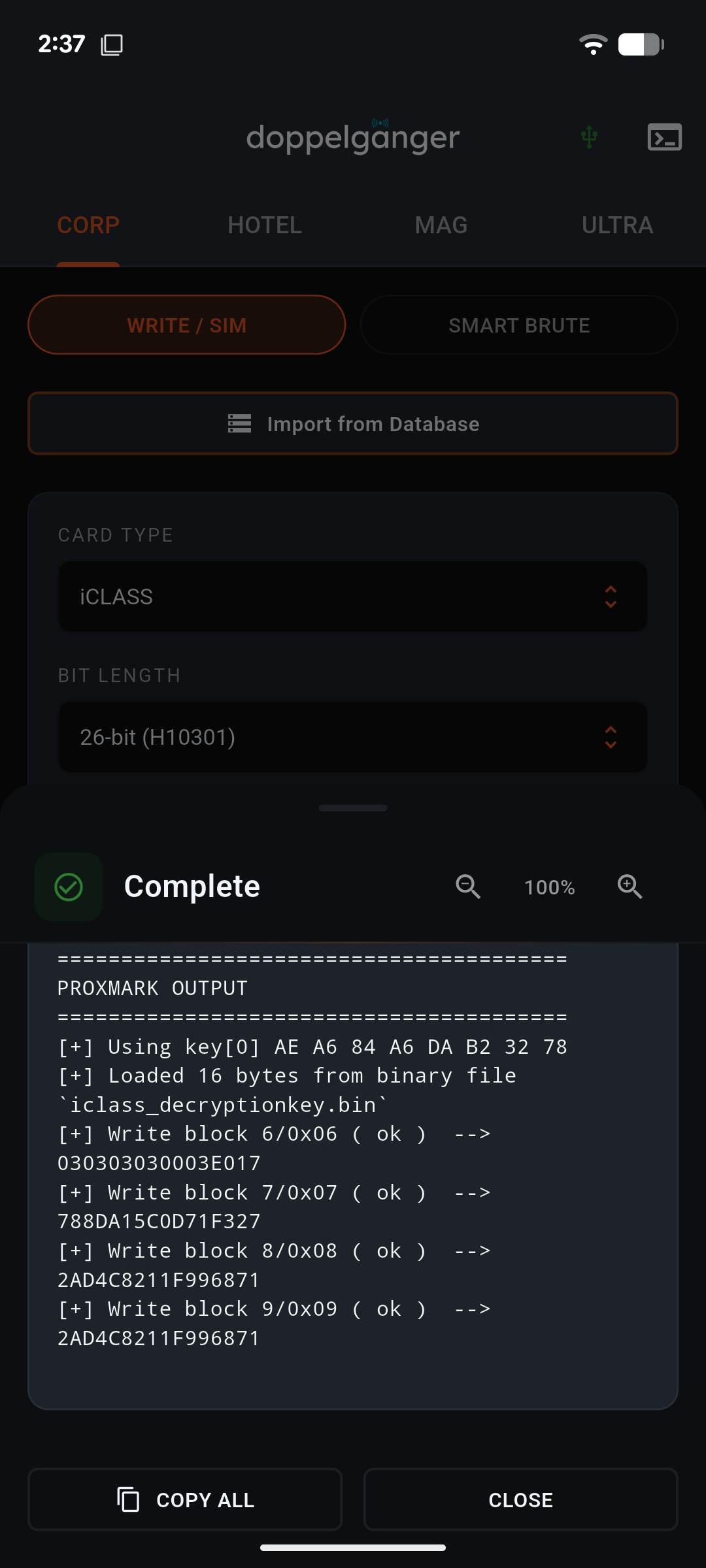
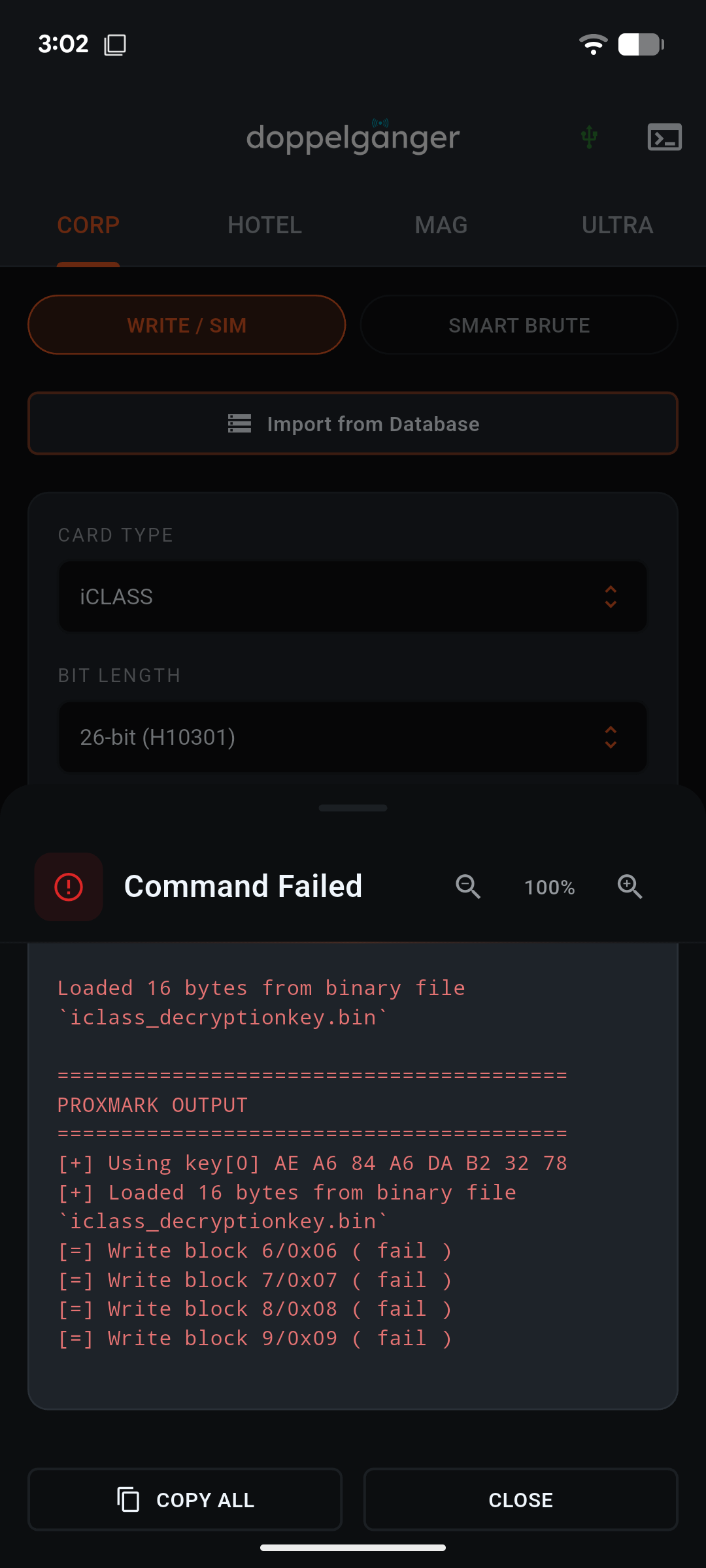
- Complete, the heading an iCLASS write ends on.
- Write block 6, the first of four block lines, marked ( ok ).
- Write block 9, the last block line, also ( ok ).
- Command Failed, in red.
- Write block 6, marked ( fail ).
- Write block 9, marked ( fail ), so nothing was written.
- Open Cards, the CORP tab, and WRITE / SIM.
- Fill the form. Tap Import from Database and pick the captured card, or set CARD TYPE to iCLASS, pick BIT LENGTH, and fill in CARD DATA yourself.
- Put the iCLASS 2K card on the Proxmark antenna.
- Press WRITE CARD. For iCLASS, ACTION offers Write and nothing else.
- Read the result sheet, down to the block lines.
An iCLASS write is an encode onto the card using the default key, and it reports one line for each block.
What a written and verified card looks like
The sheet ends Complete, and every one of the four block lines reads ( ok ) and echoes what was written.
proxmark3 [+] Using key[0] AE A6 84 A6 DA B2 32 78[+] Loaded 16 bytes from binary file `iclass_decryptionkey.bin`[+] Write block 6/0x06 ( ok ) --> 030303030003E017[+] Write block 7/0x07 ( ok ) --> 788DA15C0D71F327[+] Write block 8/0x08 ( ok ) --> 2AD4C8211F996871[+] Write block 9/0x09 ( ok ) --> 2AD4C8211F996871A bad write looks almost the same at a glance and is completely different. The sheet is headed Command Failed, and every block line reads ( fail ).
proxmark3 [+] Using key[0] AE A6 84 A6 DA B2 32 78[+] Loaded 16 bytes from binary file `iclass_decryptionkey.bin`[=] Write block 6/0x06 ( fail )[=] Write block 7/0x07 ( fail )[=] Write block 8/0x08 ( fail )[=] Write block 9/0x09 ( fail )A failed write leaves a blank card that looks like a finished one
Those two results came from the same card, the same facility code and the same card number, minutes apart. The only difference was how the card sat on the antenna. Check that every block says ( ok ) before the card goes in your pocket.
Every format the Proxmark writes to an iCLASS 2k card
| CARD TYPE | BIT LENGTH | Facility Code | Card Number |
|---|---|---|---|
| iCLASS | 26-bit (H10301) | 0 - 255 | 0 - 65535 |
| iCLASS | 30-bit (ATSW30) | 0 - 4095 | 0 - 65535 |
| iCLASS | 33-bit (D10202) | 0 - 127 | 0 - 16777215 |
| iCLASS | 34-bit (H10306) | 0 - 65535 | 0 - 65535 |
| iCLASS | 35-bit (C1k35s) | 0 - 4095 | 0 - 1048575 |
| iCLASS | 36-bit (S12906) | 0 - 255 | 0 - 16777215 |
| iCLASS | 37-bit (H10304) | 0 - 65535 | 0 - 524287 |
| iCLASS | 46-bit (H800002) | 0 - 16383 | 0 - 1073741823 |
| iCLASS | 48-bit (C1k48s) | 0 - 4194303 | 0 - 8388607 |
The whole page for this route is the CORP write page on the ATLAS site.
Writing an iCLASS 2k card with an ATLAS Chameleon Ultra
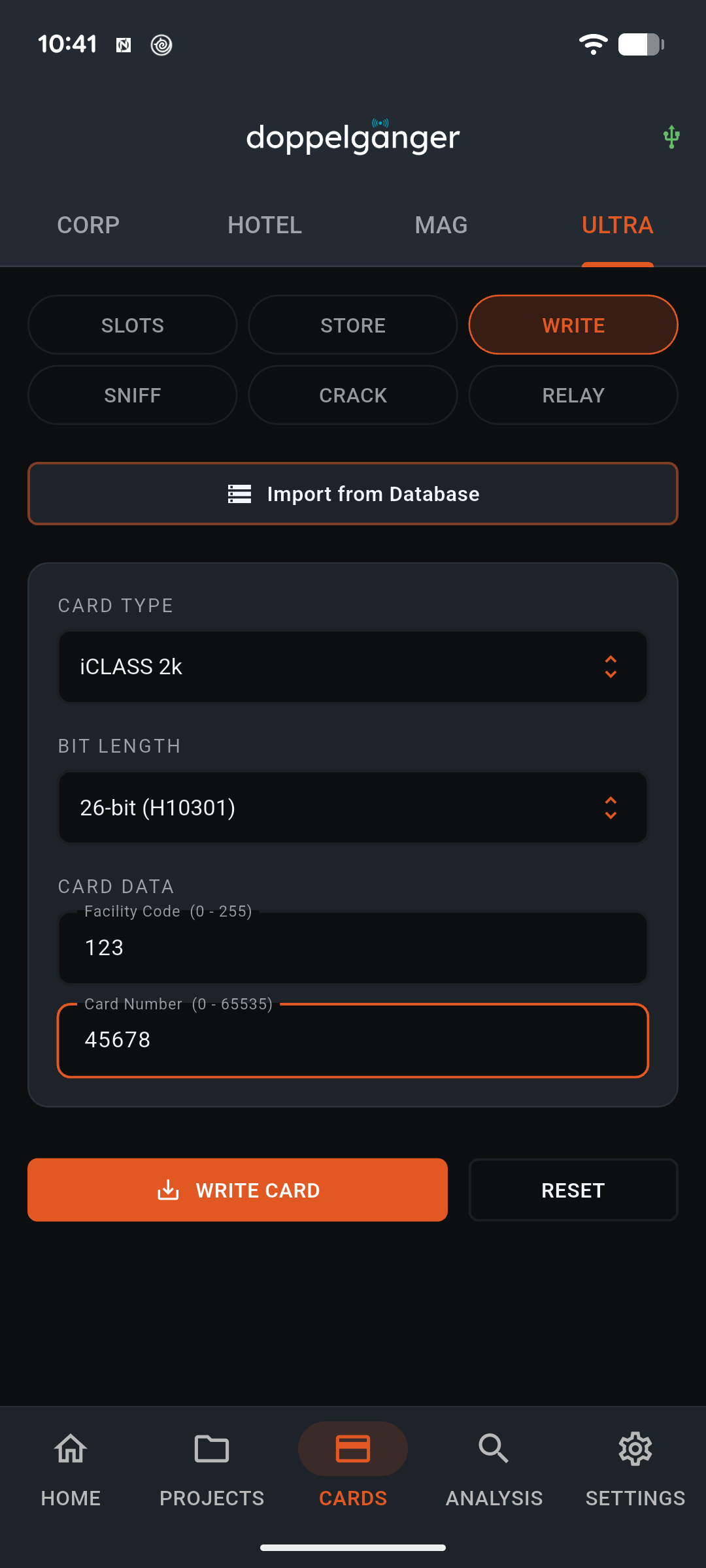
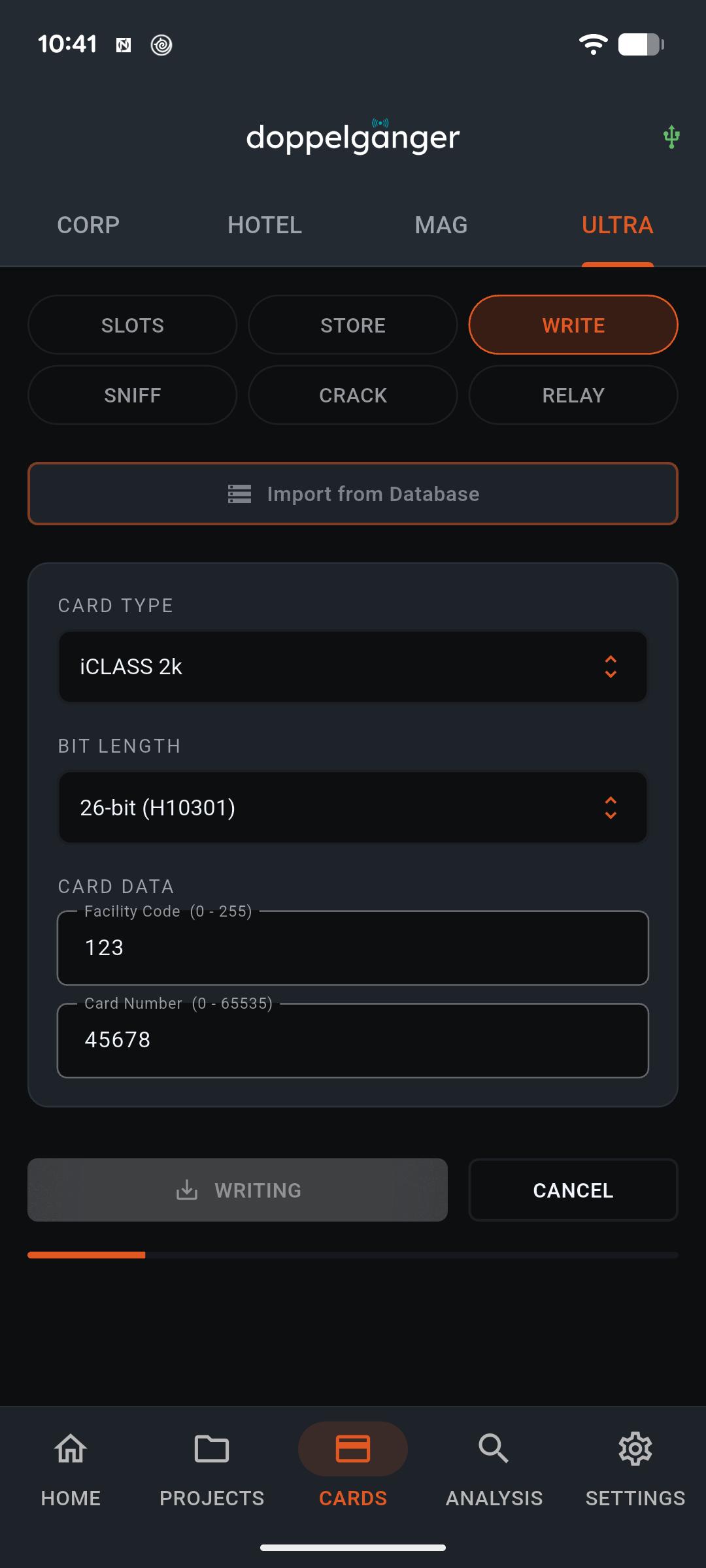
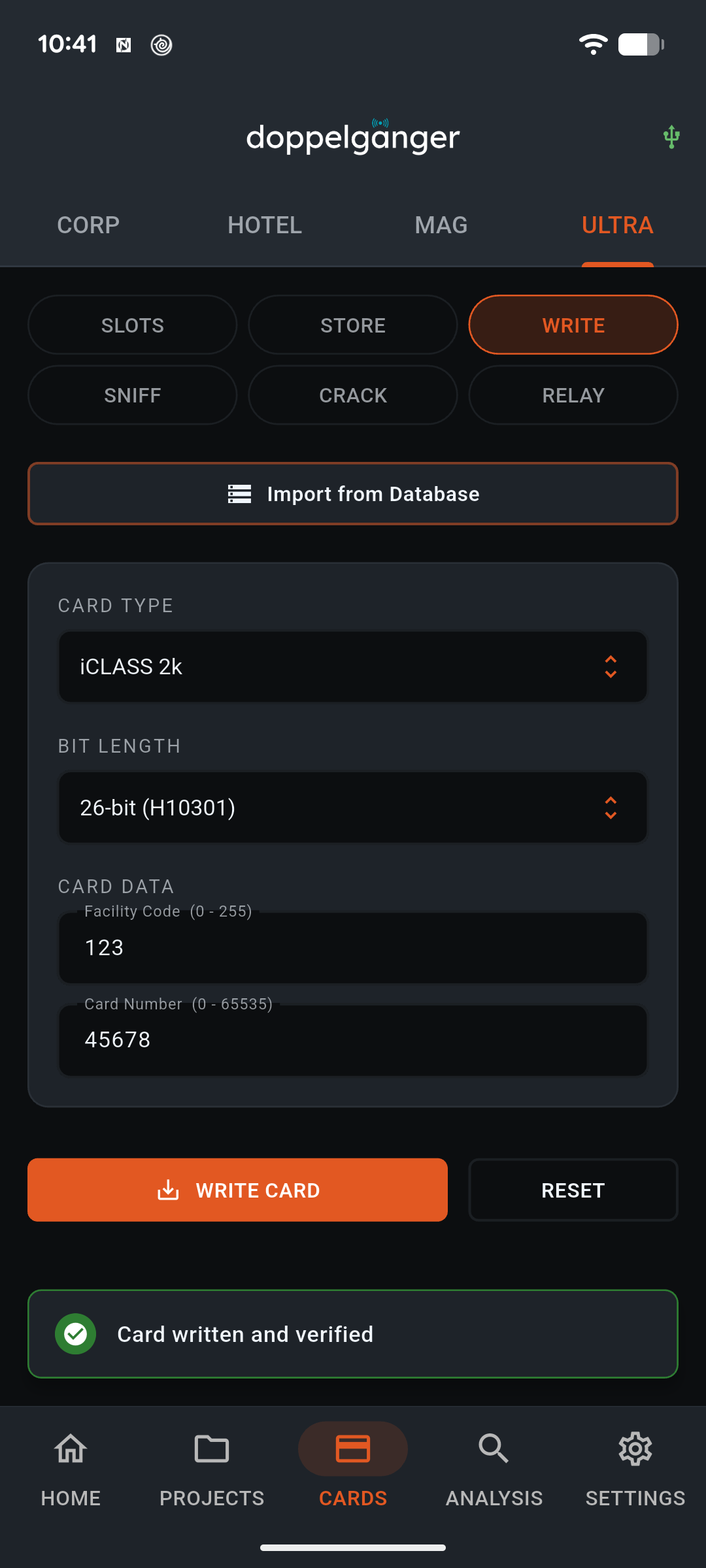
- CARD TYPE, iCLASS 2k.
- BIT LENGTH, 26-bit (H10301).
- Facility Code 123.
- WRITE CARD.
- WRITING, with CANCEL in place of RESET.
- The progress bar.
- WRITE CARD, back at rest.
- Card written and verified.
- Connect the ATLAS Chameleon Ultra. WRITE CARD stays gray without one.
- Open Cards, the ULTRA tab, and the WRITE chip.
- Fill the form. Tap Import from Database and pick the captured card. A record with
iclassin its format lands on iCLASS 2k with the matching BIT LENGTH. Or set CARD TYPE to iCLASS 2k, pick BIT LENGTH under STANDARD FORMATS or SPECIALTY, and fill Facility Code and Card Number yourself. - Lay the iCLASS 2k card flat on the ATLAS Chameleon Ultra and hold both still.
- Tap WRITE CARD.
- Keep holding until the message arrives. The control reads WRITING throughout, and the bar runs without a percentage.
- Read the message. Card written and verified is the only one that means the card in your hand carries what you entered.
The credential is written and the card is read back to confirm it. The issue level and OEM code are not asked for and are written as zero. An empty box is refused before anything is sent, with FC is required for or CN is required for and the format’s name.
What a written and verified card looks like
| Message | What happened | Do this |
|---|---|---|
| Card written and verified | The card read back exactly what was sent | Done |
| Write not confirmed, the card reads differently | The card read back something else | Write again |
| Write not confirmed, try again | A card was found and the write did not complete | Hold still and write again |
| No iCLASS card found | Nothing answered | Reseat the card on the ATLAS Chameleon Ultra |
| Not an iCLASS 2k card, nothing written | The card is not a secured 2k layout | Use an iCLASS 2k or 2k SR card |
| Card is not on the standard key, nothing written | The card is not on the standard key | It cannot be written here |
| Write refused | The device would not run the request | Check the link and try again |
| Write canceled | You tapped CANCEL. The write stops at the next point it can, and the card may already be written | Treat the card as written and unverified |
| Write failed | The command did not complete | Check the link |
| Limit | Value |
|---|---|
| Blank | An existing iCLASS 2k card or iCLASS 2k SR card. It can already hold a credential, and the write replaces it |
| Credential written | iCLASS Legacy |
| With no device connected | The form and Import from Database work, and WRITE CARD is gray |
Every format the Chameleon Ultra writes to an iCLASS 2k card
STANDARD FORMATS are the formats HID issues iCLASS credentials in.
| BIT LENGTH | Full name | Facility Code | Card Number |
|---|---|---|---|
| 26-bit (H10301) | HID H10301 | 0 - 255 | 0 - 65535 |
| 34-bit (H10306) | HID H10306 | 0 - 65535 | 0 - 65535 |
| 35-bit (C1k35s) | HID Corporate 1000 (35-bit) | 0 - 4095 | 0 - 1048575 |
| 37-bit (H10302) | HID H10302 (no FC) | Not used | 0 - 34359738367 |
| 37-bit (H10304) | HID H10304 | 0 - 65535 | 0 - 524287 |
| 48-bit (C1k48s) | HID Corporate 1000 (48-bit) | 0 - 4194303 | 0 - 8388607 |
SPECIALTY is every other format, for credential stuffing, where another vendor’s facility code and card number ride on an iCLASS card.
| BIT LENGTH | Full name | Facility Code | Card Number |
|---|---|---|---|
| 26-bit (Ind26) | Indala Wiegand 26-bit | 0 - 4095 | 0 - 4095 |
| 27-bit (Ind27) | Indala 27-bit | 0 - 8191 | 0 - 16383 |
| 27-bit (IndASC27) | Indala ASC 27-bit | 0 - 8191 | 0 - 16383 |
| 27-bit (Tecom27) | Tecom 27-bit | 0 - 2047 | 0 - 65535 |
| 28-bit (2804W) | 2804W | 0 - 255 | 0 - 32767 |
| 29-bit (Ind29) | Indala 29-bit | 0 - 8191 | 0 - 65535 |
| 30-bit (ATSW30) | ATS-W | 0 - 4095 | 0 - 65535 |
| 31-bit (ADT31) | ADT 31-bit | 0 - 15 | 0 - 8388607 |
| 32-bit (HCP32) | HCP 32-bit | Not used | 0 - 16383 |
| 32-bit (HPP32) | HPP 32-bit | 0 - 4095 | 0 - 524287 |
| 32-bit (Kastle) | Kastle 32-bit | 0 - 255 | 0 - 65535 |
| 32-bit (Kantech) | Kantech 32-bit | 0 - 255 | 0 - 65535 |
| 32-bit (Wie32) | Wiegand 32-bit | 0 - 4095 | 0 - 65535 |
| 33-bit (D10202) | D10202 | 0 - 127 | 0 - 16777215 |
| 34-bit (N10002) | N10002 | 0 - 65535 | 0 - 65535 |
| 34-bit (Optus) | Optus 34-bit | 0 - 2047 | 0 - 65535 |
| 34-bit (SMP) | SMP 34-bit | 0 - 8191 | 0 - 65535 |
| 34-bit (BQT) | BQT 34-bit | 0 - 255 | 0 - 16777215 |
| 36-bit (C15001) | C15001 | 0 - 255 | 0 - 65535 |
| 36-bit (S12906) | S12906 | 0 - 255 | 0 - 16777215 |
| 36-bit (Sie36) | Siemens 36-bit | 0 - 262143 | 0 - 65535 |
| 37-bit (H10320) | HID H10320 (BCD) | Not used | 0 - 99999999 |
| 37-bit (P10004) | P10004 | 0 - 8191 | 0 - 262143 |
| 37-bit (HGen37) | HID 37-bit Generic | Not used | 0 - 4294967295 |
| 37-bit (MDI37) | MDI 37-bit | 0 - 15 | 0 - 536870911 |
| 46-bit (H800002) | HID 800002 | 0 - 16383 | 0 - 1073741823 |
| 56-bit (avig56) | Avigilon 56-bit (20+34) | 0 - 1048575 | 0 - 17179869183 |
The whole page for this route is the ULTRA write page on the ATLAS site.
Reading the card back
The write already reads the card back before it says Card written and verified. To see for yourself what the card now holds, read it on the STORE chip: set CARD TYPE to iCLASS (Legacy) and tap READ CARD.
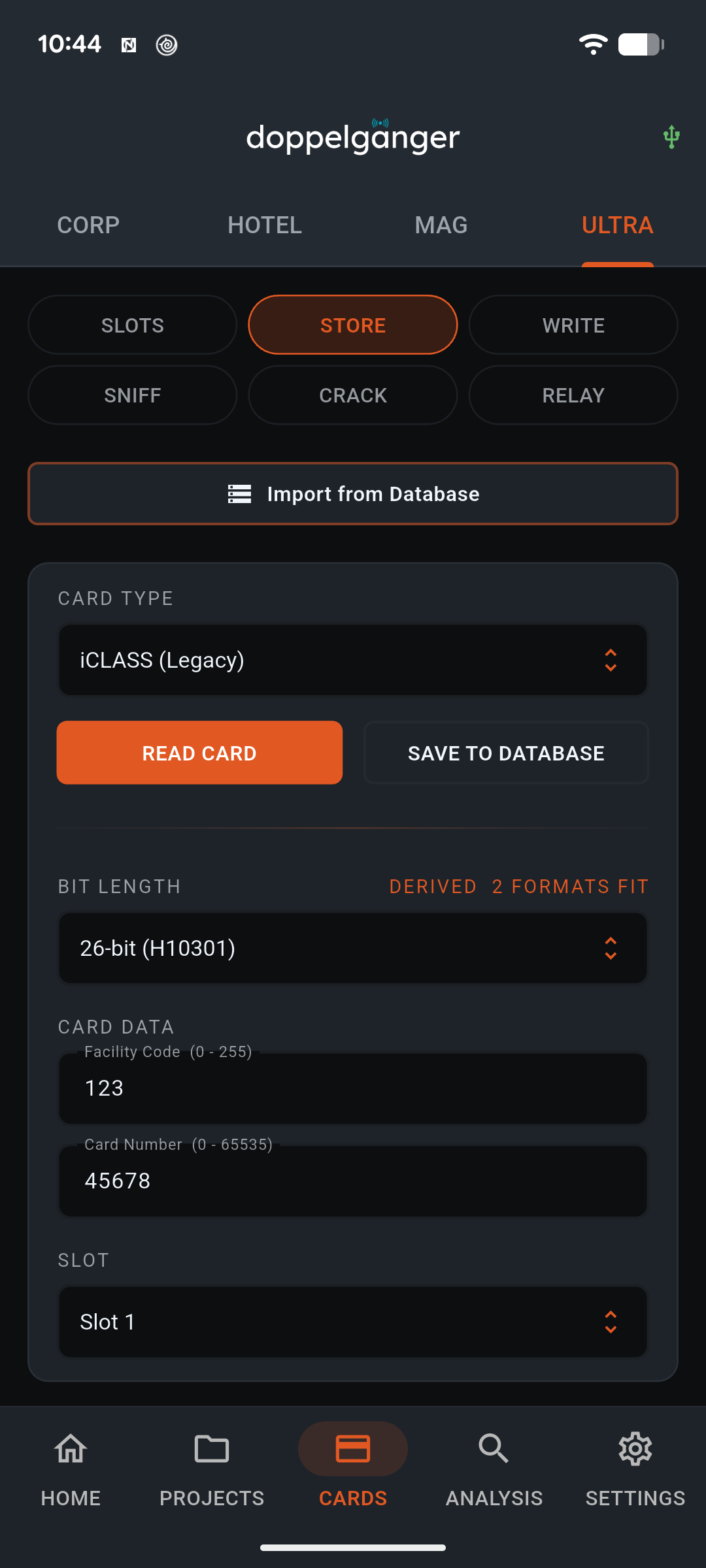
- READ CARD and SAVE TO DATABASE.
- BIT LENGTH, 26-bit (H10301), the format written, marked DERIVED 2 FORMATS FIT.
- Facility Code 123.
- Card Number 45678.
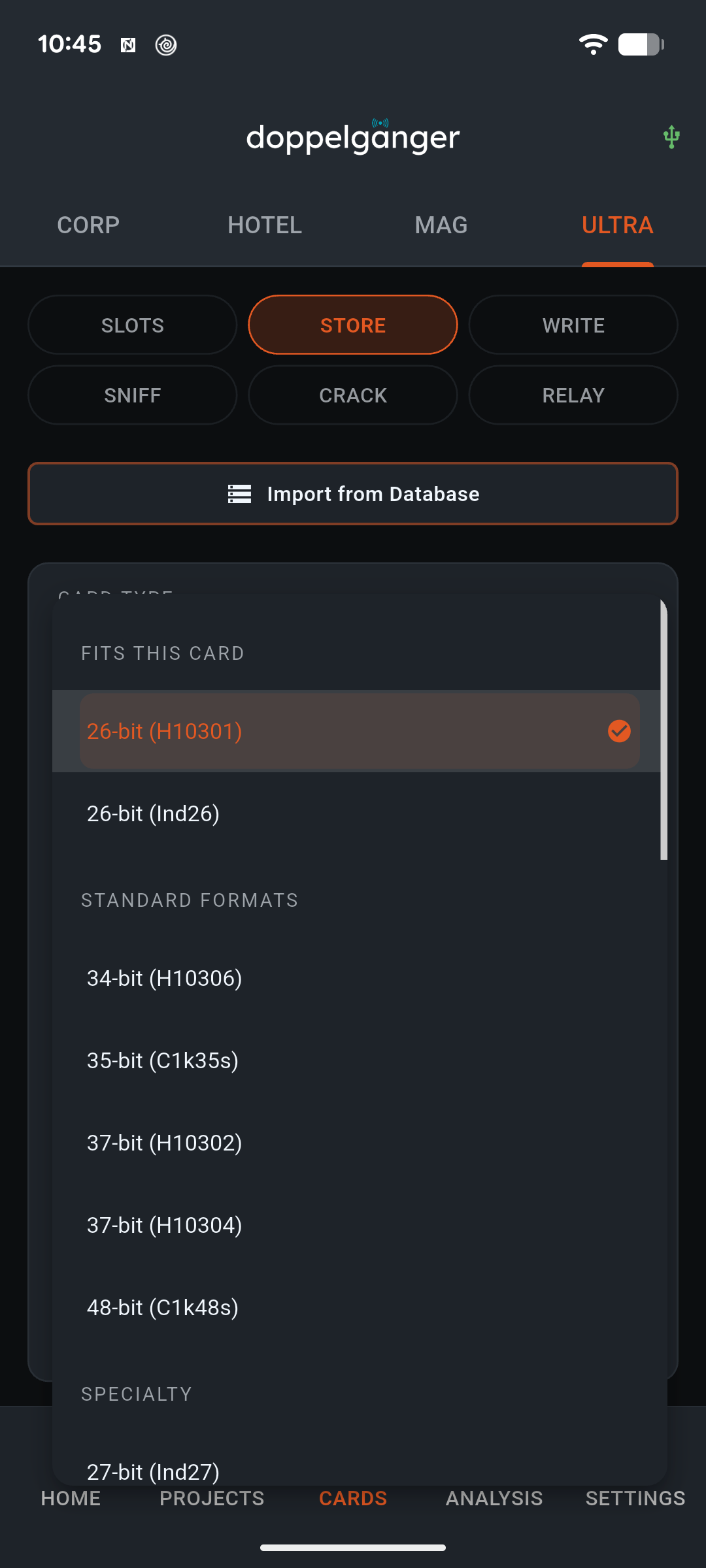
- FITS THIS CARD.
- 26-bit (H10301), the one in use.
- 26-bit (Ind26), the same bits read another way.
- SPECIALTY, every other format.
Formats that share a bit length can share a card, so the read names every format the card is a valid credential of. When more than one format fits, DERIVED and a count appear beside BIT LENGTH, and the menu lists those formats under FITS THIS CARD. The card above reads back as the 26 bit H10301 credential that was written, facility code 123 and card number 45678.
Without ATLAS, from a computer
A Proxmark3 client on a computer writes the same card, with the values typed in by hand.
| Captured | What is written | How |
|---|---|---|
| A legacy iCLASS card | Blocks 6, 7, 8 and 9, with the card data and the encryption data | hf iclass encode -w H10301 --fc 113 --cn 42683 --ki 0 |
| An iCLASS SE card, for a downgrade | Block 7 with the card data, block 6 with one byte changed from 17 to 14 to turn encryption off, and blocks 8 and 9 zeroed | Four hf iclass wrbl commands, one for each block |
Doppelgänger Assistant generates the four hf iclass wrbl commands from a bit length, a facility code and a card number, and can write and verify the card for you.
What is in the pack
The listing is a pack of legacy HID iCLASS 2k cards. The cards in the photograph are white, printed HID iCLASS DP at the lower left, with a printed number at the lower right.
Specifications
| Card | HID iCLASS 2k, legacy |
| Credentials written to it for a downgrade | Captured iCLASS, iCLASS SE or iCLASS Seos card data |
| Purpose the store lists | Writing captured card data and performing a downgrade attack |
Intended use
PPE products are professional tools for security practitioners working under contract or in the course of their employment, with the authorization of the site's owner. They are used to perform security audits, to help integrators confirm that an installation is secure, and to audit the work integrators and installers have done, so that flaws are found and remediated before someone with bad intentions finds them. They are not research devices, they are not sold as research devices, and they are not for any illegal or unauthorized purpose.
The manufacturers whose readers and credentials these products are used with make very secure products when those products are implemented properly. An audit shows where an installation falls short of that, so it can be corrected.