HID iCLASS R90SE Longrange Data Interpreter
Product documentation menu
An HID iCLASS R90SE long range reader with a Doppelgänger Core board installed, for capturing iCLASS badges from a bag.
A long range 13.56 MHz iCLASS reader with a Doppelgänger Core board inside it. Give it 12 V and it captures iCLASS badges as they pass.
| Reads | HID iCLASS Seos, iCLASS SE, iCLASS SR and standard iCLASS, MIFARE Classic and MIFARE DESFire EV1 with SIO, and the serial number of a MIFARE Classic or MIFARE DESFire card |
| Reader | HID iCLASS SE R90 |
| Frequency | 13.56 MHz |
| Power | 12 VDC on a 5.5 by 2.1 mm barrel lead |
| Beep | Silenced when bought from the PPE store |
| Firmware | Doppelgänger Core, updated from ATLAS or the browser flasher |
An iCLASS badge is made to be read up close, held against the reader at a door. That is useless to you in a lobby, where the badge is on a lanyard on somebody walking past and you have no reason to be that close to it. The R90SE is HID’s long range iCLASS reader, and it reads the same card from further away.
This interpreter is that reader with a Doppelgänger Core board installed inside it. In a bag on your shoulder, in a vehicle, in a closet or at a perimeter, it takes each iCLASS badge that comes into its field, decodes it and stores it. You are a person with a bag. Your hands are free and nobody presents anything.
What it buys you over a decoy on a wall is a capture with no placement and no return visit. What it costs is the size of the reader, a 12 V battery, and scope: it reads iCLASS that uses the standard key and nothing at 125 kHz. A site that issues Prox needs the MaxiProx.
The reader captures and stores every badge by itself. Nothing has to be connected to it for that, not a phone, not a network and not an app. You collect what it has stored afterward, from the reader’s own page in a browser or in Doppelgänger ATLAS.
In the box
The interpreter arrives assembled, wired and ready for power.
| Part | What it is |
|---|---|
| HID iCLASS R90SE Reader | the long range reader, with its read beep turned off |
| PPE Doppelgänger RFID Development Board | installed inside the reader, wired to it, and running Doppelgänger Core firmware |
It does not include a battery or a bag. Both are on PPE Satchel.
What the R90SE reads
| Card | What comes back |
|---|---|
| HID iCLASS Seos | the credential: bit length, format, facility code and card number |
| HID iCLASS SE | the credential |
| HID iCLASS SR | the credential |
| Standard HID iCLASS, the legacy card | the credential |
| MIFARE Classic carrying an SIO | the credential inside the card |
| MIFARE DESFire EV1 carrying an SIO | the credential inside the card |
| MIFARE Classic and MIFARE DESFire cards with no SIO | the card’s serial number, 32 bits, and nothing else |
The reader is the HID iCLASS SE R90, the 13.56 MHz reader with no 125 kHz side, built for the widest compatibility HID offers on this reader: it reads the Secure Identity Object, Seos and the standard iCLASS access control application, and falls back to the serial number of a MIFARE card. It does not read 125 kHz Prox.
Standard keyed HID credentials
The R90SE accepts any HID credential that is standard keyed. It does not accept Elite keyed credentials.
Every read is stored with its bit length, format name, facility code, card number, hex and raw bits. The reader has no clock of its own. It takes the time from its page or from ATLAS when one connects, and a read from that power cycle then carries a date and time.
Every format the board names
The R90SE hands the board a Wiegand frame, and the board names the format from the length of the frame. Detection is automatic. This is every Wiegand length the board names. The last column is every other format that shares the length, which ATLAS and the reader’s own Decode view can show the same read as. Decode lists every one of them. ATLAS reads frames of 26 to 62 bits and lists only the readings whose check bits the frame passes.
| Bits | Format | The board stores it as | Decode and ATLAS can show it as |
|---|---|---|---|
| 4 | one key pressed on an HID keypad | PIN | |
| 26 | HID H10301 | H10301 | AWID26, ind26 |
| 27 | Indala 27 | ind27 | indasc27, Tecom27 |
| 28 | 2804 Wiegand | 2804W | |
| 29 | Indala 29 | ind29 | |
| 30 | ATS Wiegand | ATSW30 | |
| 31 | HID ADT | ADT31 | |
| 32 | WIE32 | WIE32 | HCP32, HPP32, Kastle, Kantech, EM410x |
| 32 | PIV, MIFARE or FASC-N card serial | PIV/MiFare/FASC-N | stored as the card’s serial |
| 33 | HID D10202 | D10202 | |
| 34 | HID H10306 | H10306 | N10002, Optus34, SMP34, BQT34 |
| 35 | HID Corporate 1000 | C1k35s (C-1000) | |
| 36 | HID Simplex (S12906) | S12906 | C15001, Sie36 |
| 37 | HID H10304 | H10304 | H10320, H10302, P10004, HGen37, MDI37 |
| 38 | BQT 38 | BQT38 | ISCS |
| 39 | Pyramid 39 | PW39 | |
| 40 | P10001, Verkada 40, BC 40 or Casi-Rusco 40 | P10001, Verkada40, BC40 or Casi40 | the frame’s own check bits say which of the four it is |
| 46 | HID H800002 | H800002 | |
| 48 | HID Corporate 1000, extended | C1k48s (C-1000) | |
| 50 | AWID 50 | AWID50 | |
| 56 | Avigilon Avig56 | Avig56 | IR56 |
| 64 | HID H10309 | H10309 | named and stored with its bits. The facility code and card number are not decoded |
Any other length is stored as Unknown with its bits, so a format the board cannot name is recorded and not dropped. How each length is cut into a facility code and a card number is on Card Formats.
A 32 bit read is logged as WIE32 or as a card serial, PIV/MiFare/FASC-N. This reader sends a MIFARE card’s serial as 32 bits.
A 26 bit read from this reader is an iCLASS card
A read is a bit length, a facility code and a card number. Nothing in it says which technology it came off. A 26 bit read from an R90SE is an iCLASS credential, and writing it back means writing an HID iCLASS 2k card, not a T5577. The iCLASS 2k card takes a captured iCLASS Legacy, SE, SR or Seos credential for a downgrade. Name the reader in ATLAS after the reader on its front, and that name is written onto every card it takes.
A reader that makes no sound
A stock R90SE beeps on every read, and a bag that beeps each time somebody walks past it gets looked at. Every R90SE interpreter from PPE ships with the read beep off. It is turned off with an HID configuration card, and nothing inside the reader is modified to do it.
With the beep gone, two things tell you a badge was read.
| How | Set it up | |
|---|---|---|
| Your phone | ATLAS raises a Card Captured notification on each read, with sound, vibration or both | in ATLAS, Settings, Capture Alerts |
| The reader itself | a haptic buzzer wired inside the housing, pulsed on each read | on the board’s IO35 or IO36 pad, then GPIO CONFIGURATION in the reader’s settings |
An R90SE you already own can be silenced the same way. That is the Beep Disable service.
The parts, outside and inside
| Part | Where | What it does |
|---|---|---|
| Light bar | top edge of the front | the reader’s own light |
| Power lead | the back | a 5.5 by 2.1 mm male barrel connector. 12 VDC goes here, and it feeds the board and the reader together |
| Label | the back | the name and password of the network the reader offers for setup |
| USB-C port | on the board, behind the faceplate | firmware updates over a cable, and the serial console. Back out the 2 mm hex screw to reach it. Back out that screw and nothing else, and do not pull the support standoff out with it |
| On the board | What it is |
|---|---|
| DATA1, DATA0, GND, PWR (12V) | the screw terminal the reader is wired to. PWR (12V) and GND pass the supply through to the reader, DATA0 and DATA1 are its two data lines |
| barrel jack, marked 7.5 - 12VDC | where the power lead on the back of the reader plugs in |
| ALT PWR IN, GND and 12V | a second power input beside the jack, for a two position screw terminal. Use the jack or this input, never both at once |
| IO36, IO35 | two outputs the firmware can pulse on each read, for a haptic buzzer or another sensor |
| +3V3, +5V, GND | supply pads for whatever you wire to those outputs |
| PWR | the red power light |
| STAT | the blue status light. It blinks three times as the board starts, and it stays on for as long as the reader is offering its setup network |
| RESET | pressed twice inside five seconds, it forgets the saved WiFi network and restarts the reader. Captured cards are kept |
| BOOT | the processor’s bootloader button, for flashing. An update from ATLAS or the browser flasher does not ask you to press it |
| HOT | the regulator that steps 12 V down for the board. It runs hot |
| R90SE terminal | Wire | Board terminal |
|---|---|---|
| DATA0/DATA | green | DATA0 |
| DATA1/CLK | white | DATA1 |
| GND | black | GND |
| +VDC | red | PWR (12V) |
Power
| Supply | 12 VDC |
| Connector | 5.5 by 2.1 mm male barrel, on the lead at the back |
| What it powers | the board and the reader, from the one lead |
| Battery | not included. The 7,000mAh Power Supply has two 12 VDC barrel outputs made for it |
| Startup | power on, power off, power on |
Never more than 12 VDC
Do not supply more than 12 VDC to the board. Overvoltage can overheat it or start a fire, and a board damaged by wiring or voltage misuse is not replaced. Read the supply before the connector goes in.
Power on, off, and on again, every time
The board sits behind capacitors that have to charge before it starts reliably. A reader that has been sitting unpowered has drained them, and the first power up only charges them. The second is the one that boots. Nothing on the outside of the reader tells you which case you are in, so do it on every startup.
From power to the first badge
- Connect a 12 VDC supply to the barrel lead.
- Switch the supply on, off, and on again.
- The reader lights. The board starts with it and begins storing every card the reader takes. It needs no phone and no network to do that.
- Present an iCLASS card whose numbers you know and check that the same numbers come back.
- Put it in the bag.
The PPE Satchel is sized for this reader and carries over the shoulder or as a backpack.
Getting the cards off it
Everything the reader captured is in the board’s own storage, whether or not anything was connected while it captured. There are two ways to collect it.
| A browser, on the reader’s own page | Doppelgänger ATLAS | |
|---|---|---|
| What you need | a laptop, or any second device with a browser | ATLAS on an Android phone |
| How you reach the reader | the reader joins a WiFi network you give it, and you open its page on that network | the app finds the reader and connects to it |
| What you see | every stored read with its format, facility code, card number, hex and bits, and every other format the same bits can be | the same reads, on your phone as they are taken, with a notification for each |
| Where the cards end up | on screen, and in a file you download | the ATLAS card database, under a project, with the reader’s name and where you were |
| Using a read | copy the numbers out and write the card with another tool | sent straight to a Proxmark or an ATLAS Chameleon Ultra to be written |
Put the reader on a WiFi network
The reader’s page is served over WiFi, so the reader has to be on a network first. A reader with no saved network offers one of its own and serves a setup page on it. It goes on capturing cards the whole time.
| The reader’s own network | doppelganger_XXXX, where XXXX is the last four hex digits of its MAC |
| Its password | UndertheRadar |
| Setup page | opens itself when you join. If it does not, http://192.168.4.1/setup |
| What that network reaches | the setup page and nothing else. No captured read is served on it |
| The STAT light | on for as long as the network is offered |
| How long it stays | 3 minutes with nobody on it, 10 minutes with a device on it. Then it closes and the reader goes on capturing |
- Have the network you want the reader on up and in range. In the field that is your phone’s hotspot, with Turn off hotspot automatically switched off so Android does not drop it while nothing is connected.
- Power the reader, on, off, on.
- From a laptop, join
doppelganger_XXXXwith the passwordUndertheRadar. Use a laptop and not the phone when the phone is the hotspot. - On the setup page, pick your network under NETWORKS, type that network’s password, and tap JOIN.
- The page reads Joined. The reader restarts onto the network.
The reader keeps that network and rejoins it by itself whenever both are on. Every state the setup page reports, and the setting for how long the reader waits before offering setup, are on Core Firmware.
In a browser, on the reader’s own page
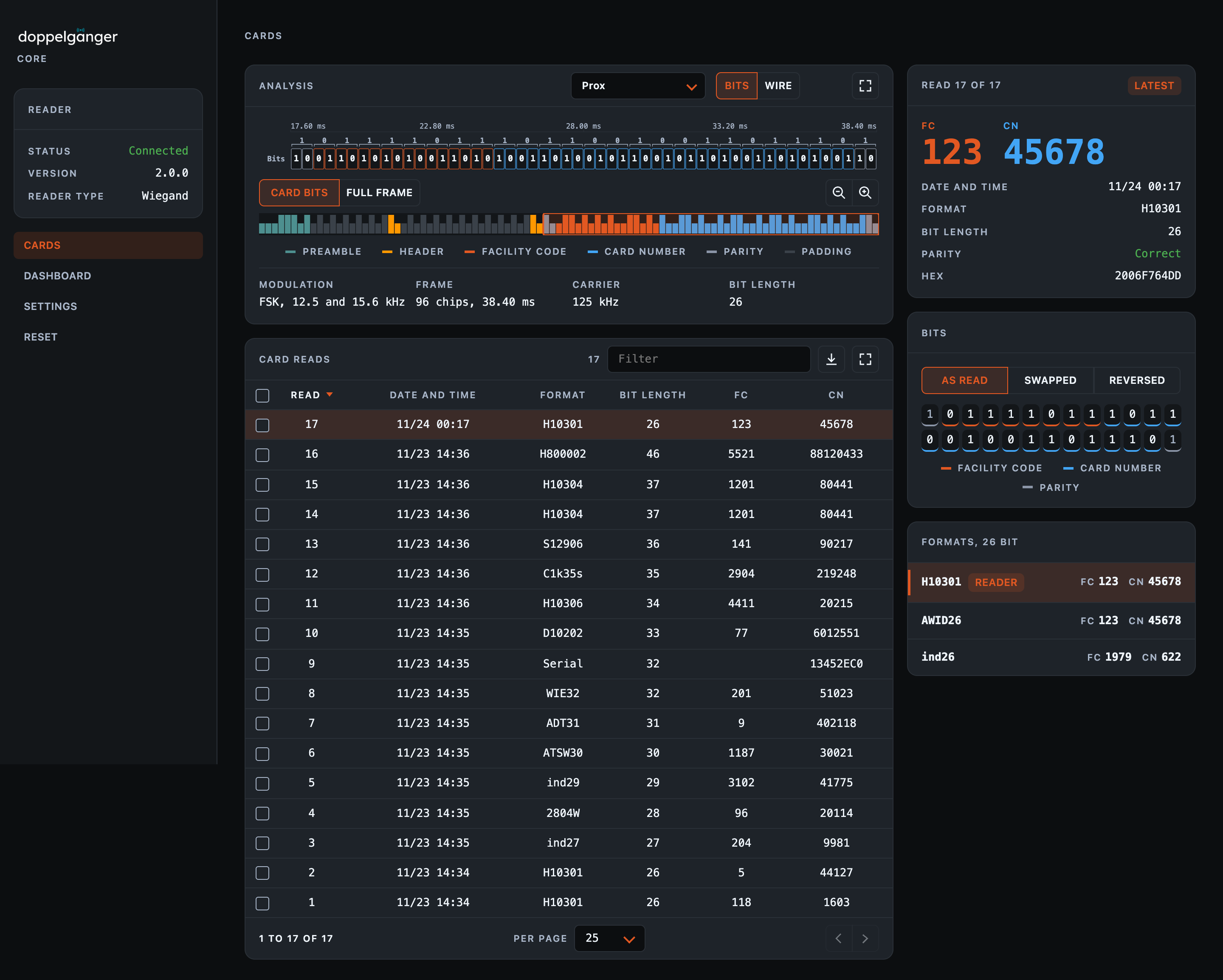
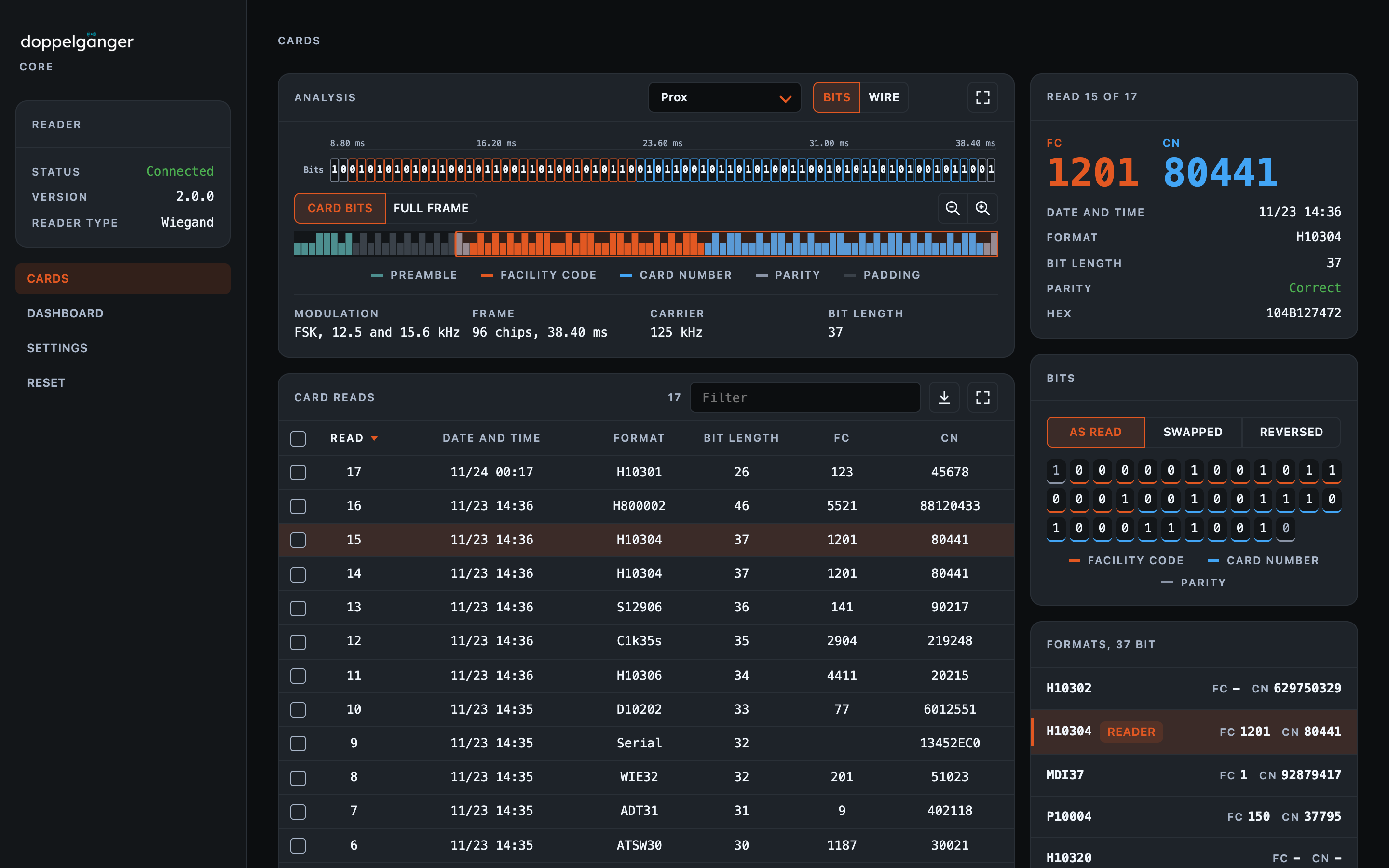
- On a device on the same network, open
http://rfid.local, or the address the network gave the reader. The page needs no app and no login. - Cards lists every stored read. Click one for its hex, its bits and every other format of the same length.
- Use the download control beside the filter to save the reads as a file.
- When the reads are safely off the reader, open Reset and click ERASE STORED CARD DATA.
On a network with a route to the internet, Notifications under Settings emails each read as it is taken. Every tab, setting and button on the page is documented on Core Firmware.
In Doppelgänger ATLAS
ATLAS connects to the reader over Bluetooth or WiFi. Either way the reader’s settings, its cards and its firmware updates are all in the app.
| ATLAS over WiFi | ATLAS over Bluetooth | |
|---|---|---|
| How the phone connects | the reader is on the phone’s hotspot, and the app finds it there | the app links to the reader by itself when it is in range |
| Setting it up | put the reader on the hotspot, as above | once, with the reader on WiFi: CONFIGURE, SET UP BLUETOOTH, enter a pairing card you will carry and present it at the reader, PAIR, present it again, USE BLUETOOTH |
| Reads already on the reader | IMPORT copies them into the card database under a project | delivered by themselves when the phone links |
| The reader’s own page | WEB APP opens it inside the app | not served |
| What is on the air | the phone’s hotspot, by name, for as long as the reader is out | an unnamed advertisement, and no hotspot |
An import copies. The reader still holds every read afterward, so clear it with WIPE ALL CARDS under CONFIGURE once they are in ATLAS. Carry the pairing card you chose. Presented with no phone waiting to pair, it takes a reader that ATLAS reached over Bluetooth back to WiFi, which is how you get a reader back when the paired phone is lost or flat.
The cards it acts on
A Core watches for cards that are instructions and not captures. Neither is stored as a read.
| Card | From the factory | What presenting it does |
|---|---|---|
| Reset card | 35 bit, facility code 111, card number 4444 | a full factory reset. Every setting and the saved WiFi network go, every phone paired from ATLAS is removed, and the reader comes back offering its setup network. The captured cards are kept |
| Pairing card | none until you choose one in ATLAS | used by ATLAS to pair a phone with the reader. See In Doppelgänger ATLAS |
The reset card is set on the reader’s own page, under Settings, Reset Card Settings, as a BIT LENGTH of 26, 35, 37 or 48 with a FACILITY CODE and a CARD NUMBER, or in ATLAS. The pairing card is 26 bit H10301, 35 bit Corporate 1000, 37 bit H10304 or 48 bit Corporate 1000, and cannot be the same card as the reset card. Both have to be cards this reader can read, so make them as iCLASS. The stealth card belongs to the Stealth and MFAS decoy readers. A Core has none.
A site badge that matches the reset card resets your reader
The reset card is matched on bit length, facility code and card number, and the factory value is published. A live credential that happens to match wipes the reader’s settings while it is in your bag. Set it to a value the site will never present.
Firmware
The board runs Doppelgänger Core firmware. It is installed and updated from Doppelgänger ATLAS or from the browser flasher on a computer. An update keeps the reader’s settings and its captured cards.
For an update over a cable, reach the USB-C port behind the faceplate and run the reader from USB power alone. Do not leave the 12 V supply connected while firmware is written.
The steps for each way are on Flashing and Updating.
Intended use
PPE products are professional tools for security practitioners working under contract or in the course of their employment, with the authorization of the site's owner. They are used to perform security audits, to help integrators confirm that an installation is secure, and to audit the work integrators and installers have done, so that flaws are found and remediated before someone with bad intentions finds them. They are not research devices, they are not sold as research devices, and they are not for any illegal or unauthorized purpose.
The manufacturers whose readers and credentials these products are used with make very secure products when those products are implemented properly. An audit shows where an installation falls short of that, so it can be corrected.