Relay
Product documentation menu
Carry a live transaction between a reader at the door and the genuine credential somewhere else, with two handsets and two ATLAS Chameleon Ultras, to find out whether anything at that reader stops it.
A site that has moved to DESFire EV3 or Seos has a credential that cannot be copied, and a report that stops there tells the client nothing about the door. The open question is whether the reader will accept the real card answering from somewhere else: a badge on a desk, in a jacket on a chair, in a pocket in the lobby queue. A relay puts one handset beside the card and one at the reader and carries the conversation between them, and whether the door opens is the finding.
What it costs is people and kit. It takes two handsets, two ATLAS Chameleon Ultras, a network both handsets can reach, and the genuine credential on one unit while the other unit is at the door.
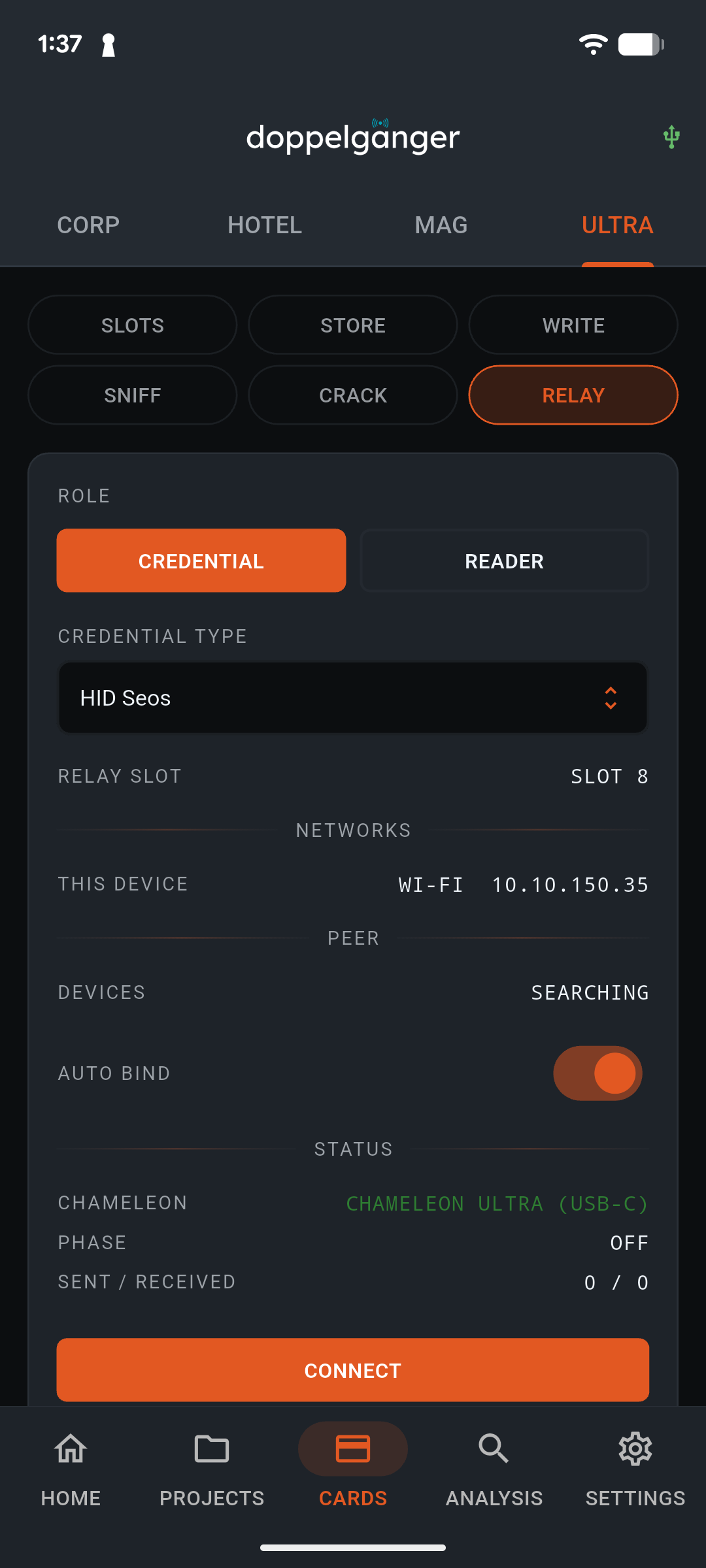
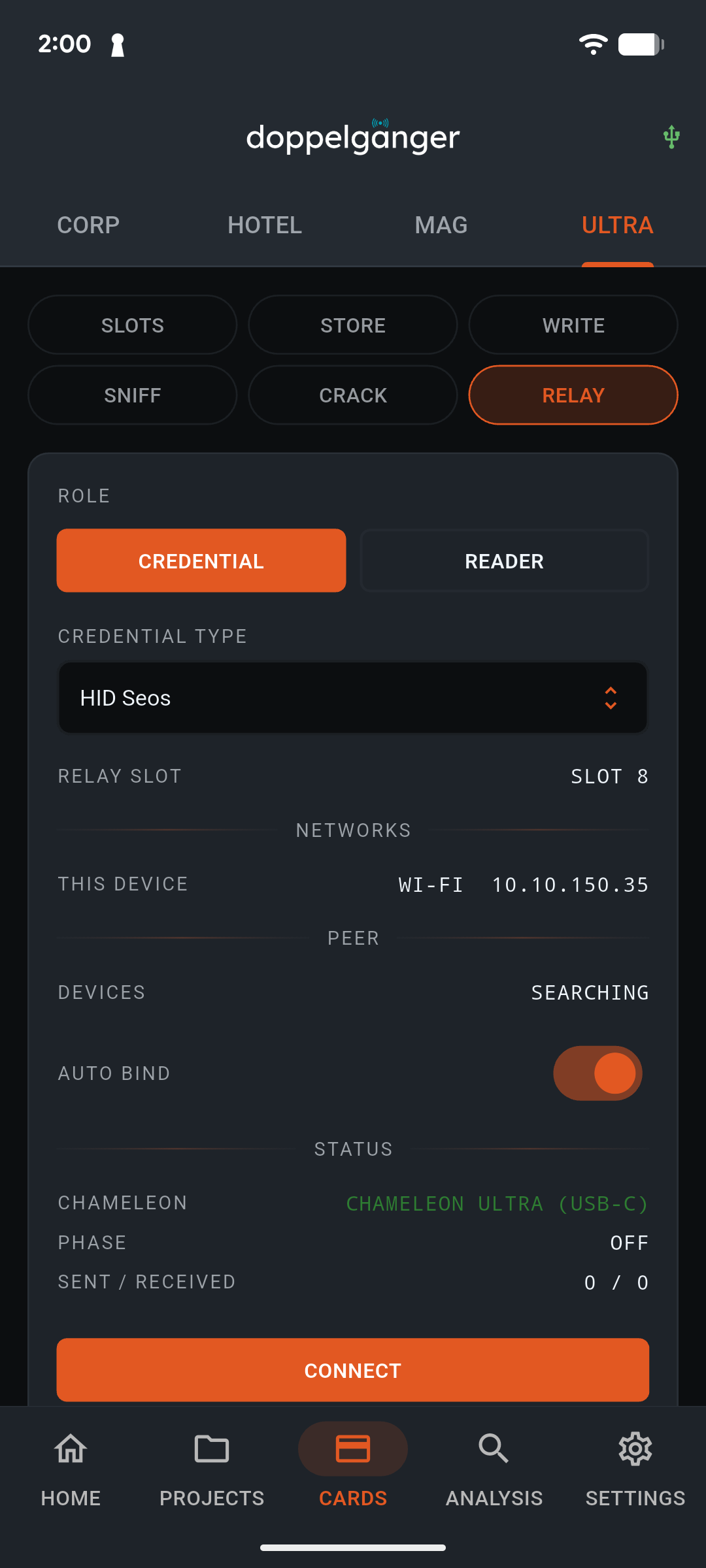
- ROLE, CREDENTIAL or READER.
- CREDENTIAL TYPE, HID Seos here.
- RELAY SLOT, SLOT 8.
- CONNECT starts both handsets.
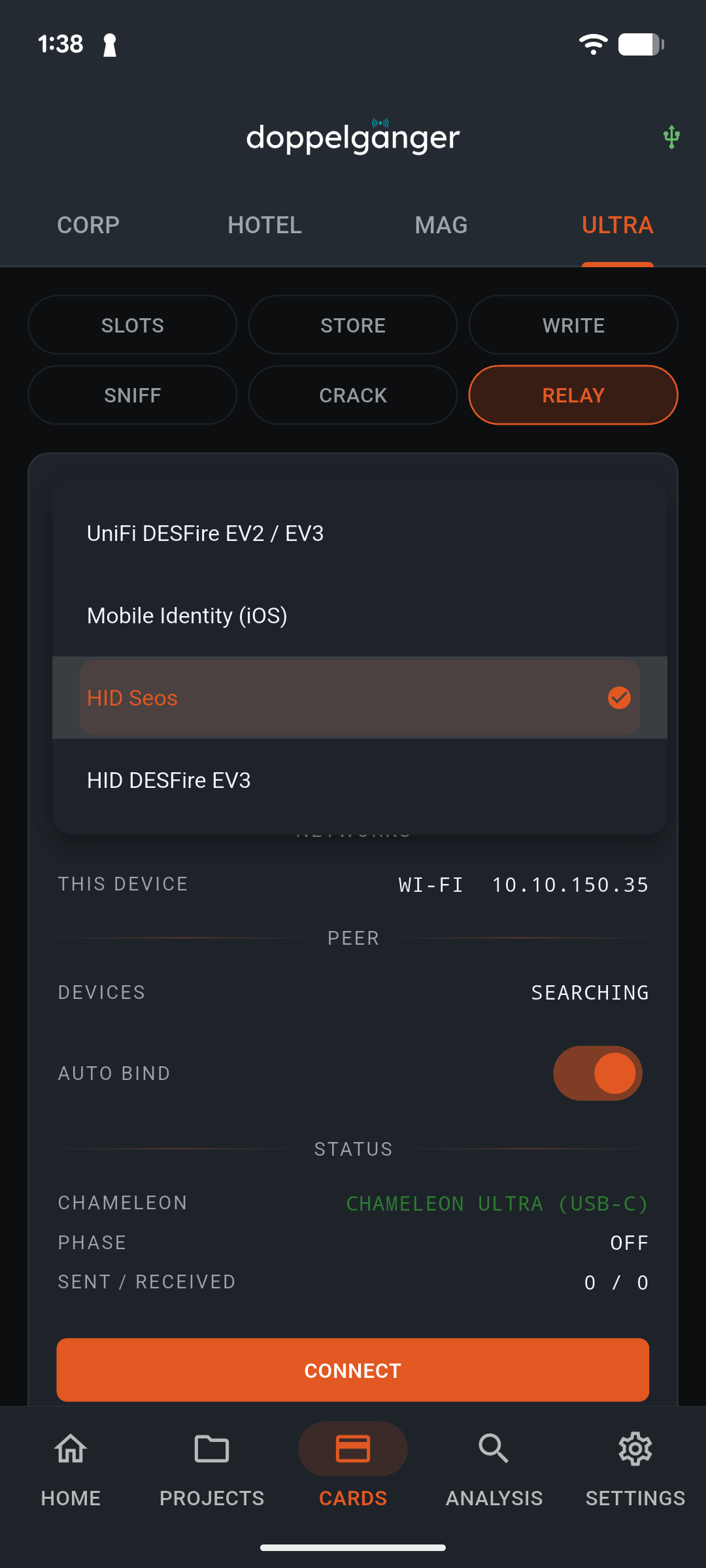
- UniFi DESFire EV2 / EV3.
- Mobile Identity (iOS).
- HID Seos.
- HID DESFire EV3.
A relay carries the conversation, it does not copy the card
Cloning is an answer to a question most sites have stopped asking. A prox card or a legacy iCLASS credential can be captured at a distance with a long range reader, or collected by a decoy reader left where staff will present to it, and written to a card afterward. That finding is real and it still lands, because plenty of sites are still on that stock. But it is a finding about a credential generation the market is leaving.
What replaces it is built so that the copy cannot be made. DESFire EV3 and Seos are not weak ciphers wrapped in marketing. The keys are diversified per card, the authentication is mutual, and the session is encrypted. Hand a consultant one of those and the honest report says the credential cannot be cloned. Correct, and close to useless to the client, because it says nothing about whether the deployment is sound.
A relay does not copy the card. The genuine credential answers the genuine reader, in real time, from wherever it actually is. Nothing is forged and nothing is broken. The cryptography is not defeated, it is satisfied, by the only thing that could satisfy it, which is the real card. Every protection that makes the credential impossible to clone is still working perfectly while the door opens.
It is not only plastic either. A mobile access credential in an iPhone is in scope the same way, depending on what the manufacturer implemented.
Why it is the test that matters on a credential that cannot be cloned
The only thing that stops a relay is a bound on distance: a proximity check, a timing constraint on the exchange, a reader that refuses an answer that took too long to come back. Whether any of that is present, switched on and correctly configured is a property of the vendor’s implementation and the installer’s configuration, not of the credential standard. It is not on the datasheet, and the integrator will tell you it is handled.
So it has to be measured, and running the relay is the measurement. The questions it answers are the ones a client is actually buying.
| The question | What the relay settles |
|---|---|
| Is a proximity or timing check present at all | Whether the reader refuses a delayed exchange, or opens regardless |
| Is it switched on in this deployment | A vendor can ship the control and an installer can leave it off |
| Is it tuned usefully | A bound generous enough to tolerate a relay is a bound that is not doing anything |
| Does it hold across every reader on site | A lobby configured correctly and a side door that was never touched |
| Does the credential behave as the vendor claims | Some answer from a pocket, locked, with no interaction at all |
Relay testing has been a lab exercise, done by people with the hardware, the firmware and the time to build a rig. Here it is two handsets, two ATLAS Chameleon Ultras and a start button, which is the difference between a capability a specialist has and a test a consultant can sell and run on site.
What you need
| You need | Why |
|---|---|
| Two handsets running ATLAS, on the same build | One handset takes each side, and the two pass the messages across the network |
| Two ATLAS Chameleon Ultras on ATLAS firmware | The two units carry out the card conversation between themselves |
| Each unit on its handset’s USB cable | The relay runs on the cable only |
| An address on the same network for both handsets | The handsets find each other and pass messages over it |
| Each handset’s own NFC switched off | A handset that is polling picks its unit up and interferes with the session |
| The genuine credential, at the handset set to CREDENTIAL | It is the only thing that can answer the reader |
One handset takes each side, chosen under ROLE.
| ROLE | That handset and its unit are | The unit’s lights show |
|---|---|---|
| CREDENTIAL | With the genuine card | Light 1, red, while a relay is running |
| READER | At the door | Light 8, green, while a relay is running |
Each unit has to be on its handset's USB cable
CONNECT is gray with no ATLAS Chameleon Ultra connected. When ATLAS is connected to the unit over Bluetooth and no cable is plugged in, it refuses with The relay runs on the USB cable only. Connect the Chameleon on the cable and start again.
Every credential type that can be relayed
CREDENTIAL TYPE names the kind of credential. Set it on the handset you press CONNECT on, and the other handset takes the same one.
| CREDENTIAL TYPE |
|---|
| UniFi DESFire EV2 / EV3 |
| Mobile Identity (iOS) |
| HID Seos |
| HID DESFire EV3 |
A mobile credential in an Android wallet is not on the list.
If you do not yet know what the reader takes, find out first. FINGERPRINT READER on the SNIFF chip names the technologies a reader accepts before any card is presented. See SNIFF on the ATLAS Chameleon Ultra page.
Running a relay
- Put each ATLAS Chameleon Ultra on its handset’s USB cable, and switch each handset’s own NFC off.
- On each handset open Cards, the ULTRA tab, then the RELAY chip.
- On one handset, set ROLE and CREDENTIAL TYPE. The other handset does not need setting. It takes the opposite role and the same type when the first one starts.
- Read NETWORKS on both. The two handsets have to hold an address on the same network.
- Put the genuine card on the CREDENTIAL unit.
- Tap CONNECT on either handset. One press starts both. The button reads CONNECTING, then STOP.
- Watch PHASE under STATUS.
- Tap STOP on either handset. It stops both.
CONNECT waits up to 10 seconds for the other handset to answer.
| What it says | Which handset | What happened |
|---|---|---|
| The other phone has not answered, still listening | CREDENTIAL | Nothing answered in the 10 seconds. This handset goes on listening, so the other one can still start the relay from its side |
| The other phone has not answered | READER | Nothing answered in the 10 seconds, and nothing was started |
| The other handset is on an older build and cannot say which relay it started. Update it, or start both by hand on the same one. | Either | The other handset runs an older ATLAS than this one |
| The other handset asked for a relay this build does not have. Update both handsets. | Either | This copy of ATLAS does not have the relay the other handset asked for |
Every reading on the RELAY chip
- THIS DEVICE, the kind of network and the address this handset holds.
- DEVICES, SEARCHING, until the other handset answers.
- AUTO BIND, on.
- PHASE, OFF, between CHAMELEON and SENT / RECEIVED.
NETWORKS, both handsets side by side
NETWORKS lists every address this handset holds, one THIS DEVICE row each, as the kind of network and the address. Once the other handset is found its addresses follow as PEER rows, and the one the relay is using is picked out in the accent color.
| Row | Reads |
|---|---|
| THIS DEVICE | One row for each address, or NO INTERFACE with no network at all |
| PEER | One row for each address the other handset holds |
| LINK | While a relay runs, one value: the delay to the other handset in milliseconds, as ms avg. Green up to 77 ms, the warning color above it |
Two handsets on one network name can still sit on different subnets, and this is where it shows: no THIS DEVICE address shares a network with any PEER address.
PEER and AUTO BIND
AUTO BIND decides who picks the other handset.
| AUTO BIND | The PEER card shows | When to use it |
|---|---|---|
| On | DEVICES, SEARCHING until a handset answers, then PEER with that handset’s name | Two handsets and nobody else running ATLAS on the network |
| Off | A dropdown reading SELECT A HANDSET, listing every handset answering by name with its role, CARD or DOOR, and its credential type, then PEER ADDRESS and BIND ADDRESS | Several handsets on one network, or a handset that is not being found |
AUTO BIND only ever chooses. It never starts a relay, and CONNECT stays a deliberate press.
PEER ADDRESS takes the other handset’s address as four numbers, and BIND ADDRESS commits it, answering Bound to and the address. Anything else is refused with Not an IPv4 address. Both controls are hidden while a relay runs.
STATUS, and what each PHASE means
| Row | Reads |
|---|---|
| CHAMELEON | The connected unit by name, in green. With no unit connected, the connection state in gray: DISCONNECTED, SCANNING, CONNECTING or ERROR |
| PHASE | Where the relay is, in the table below |
| SENT / RECEIVED | Messages passed to the other handset and taken from it |
| RADIO | ENERGIZING, shown only while the unit is energizing its field |
| PHASE | Seen on | What it means |
|---|---|---|
| OFF | Either | No relay is running |
| WAITING FOR PEER | CREDENTIAL | This handset is up and the other has not linked yet |
| SEEKING CREDENTIAL | CREDENTIAL | The unit is looking for the card. A number in brackets counts its tries |
| AWAITING CREDENTIAL | READER | Linked, and holding off until the other side has the card |
| ARMING | READER | The card is found and the unit is not on the air yet. This takes seconds |
| RELAYING | Either | Both units are up and messages are passing |
| NO CREDENTIAL | Either | The CREDENTIAL unit never found the card. On the CREDENTIAL handset a number in brackets counts its tries |
RELAY SLOT
RELAY SLOT is a reading, not a setting, and it reads SLOT 8. A relay session always runs in that slot, which is why the credential you intend to present at a door from the unit itself is better kept in SLOT 1 to SLOT 7.
The phone’s own NFC gets in the way
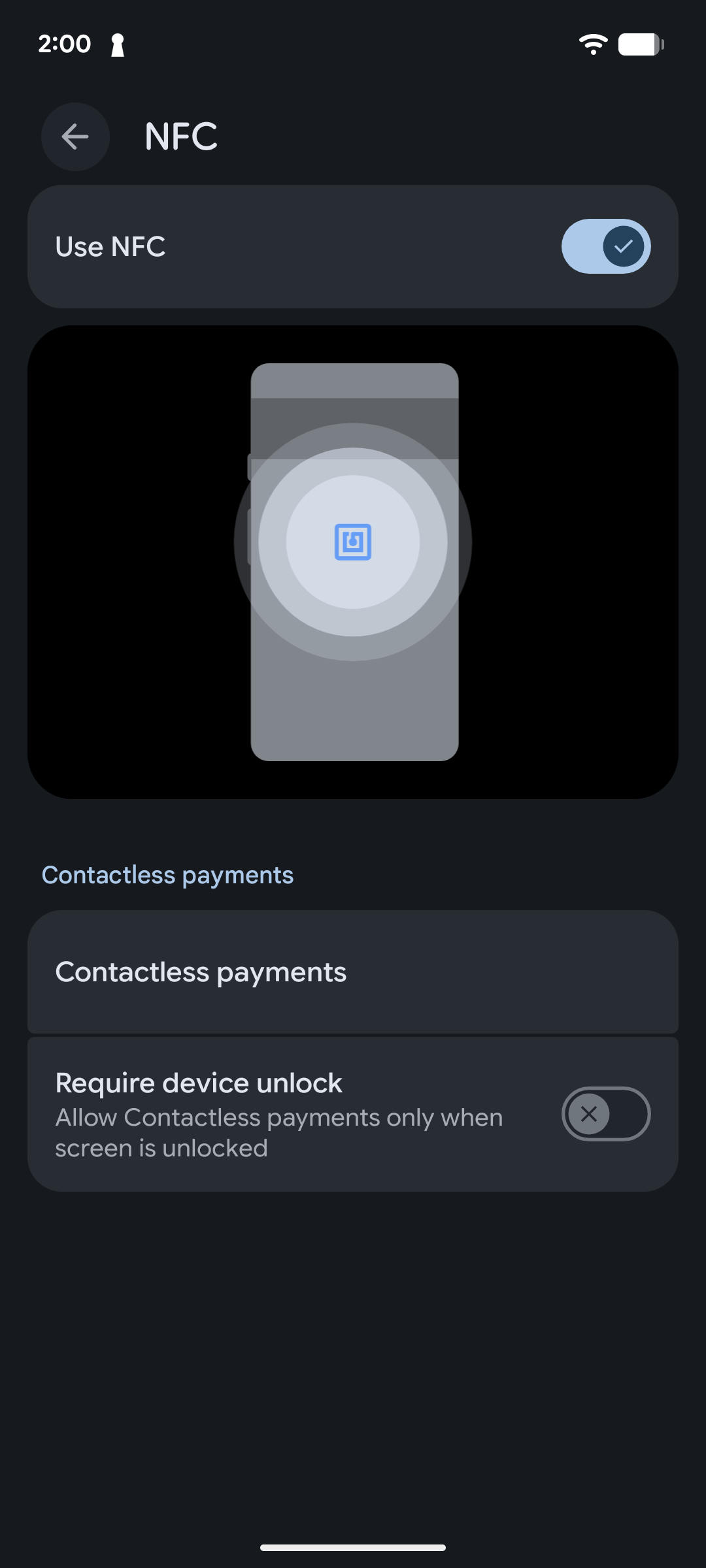
On the RELAY chip only, the tab’s banner can read PHONE NFC IS ON - TAP TO TURN IT OFF. The handset and its unit sit a few centimeters apart, and a handset whose own NFC radio is on picks the unit up and interferes with the session. ATLAS cannot switch that radio itself. Tapping the banner opens Android’s NFC settings, and the banner clears within about two seconds of the radio going off.
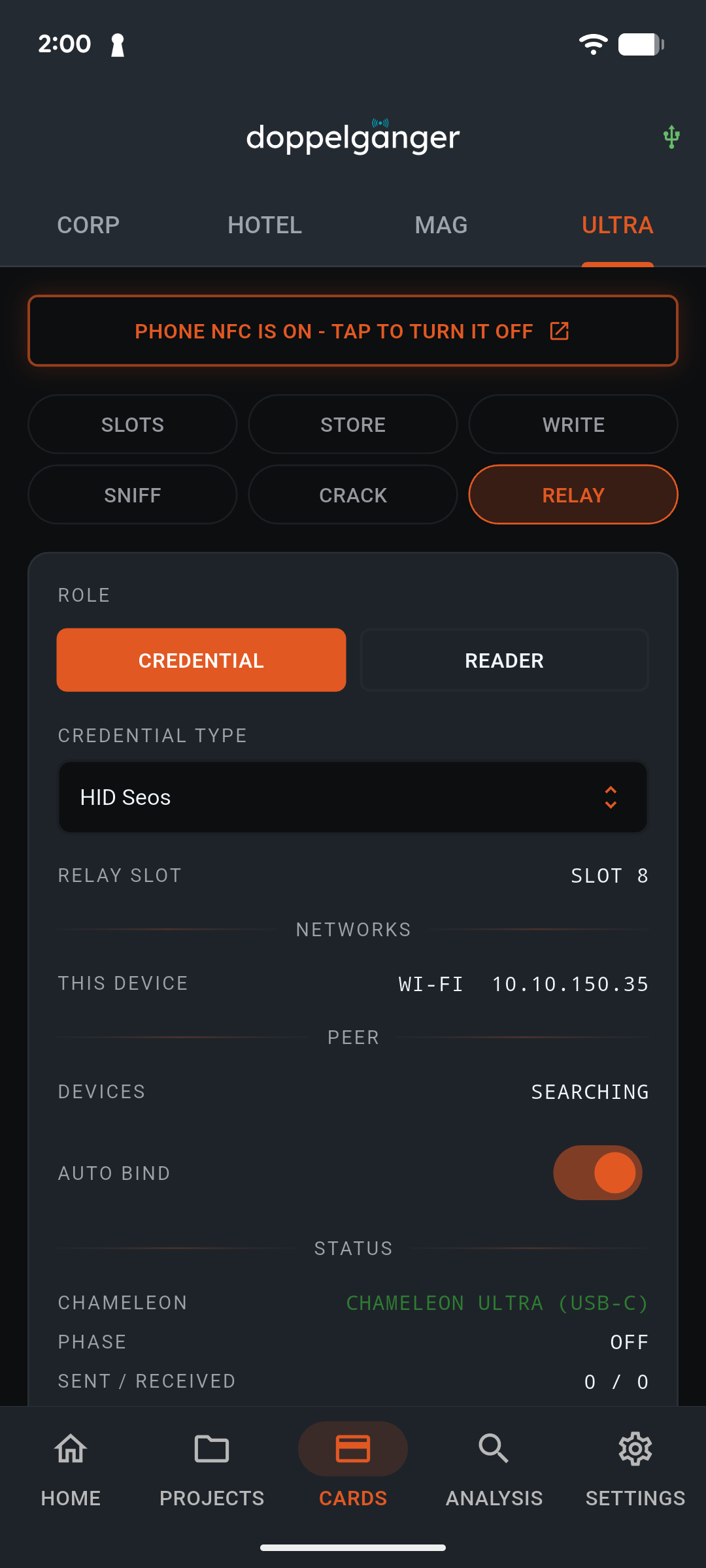
- PHONE NFC IS ON - TAP TO TURN IT OFF.
- RELAY, the only chip that shows it.
- NFC, the Android settings page the banner opens.
- Use NFC, to switch off before going back.
- No banner, so the chips move up.
- RELAY.
With no ATLAS Chameleon Ultra connected, the banner reads NO CHAMELEON ULTRA DEVICE CONNECTED instead, as it does on every chip.
What the lights on each unit show
| You see | It means |
|---|---|
| Light 1 red | A relay is running and this unit is at the card |
| Light 8 green | A relay is running and this unit is at the door |
| Three red flashes after a button press | Refused. A slot cannot be changed from the buttons during a relay |
| No role light during a relay | Relay lights is switched off on this unit |
Light 1 is nearest the USB port and light 8 is farthest from it. The role lights can be switched off for a unit that must stay dark, with Relay lights under Settings, Connection Settings, the ULTRA chip, DEVICE SETTINGS. With it off there is no role light during a relay, and the field light stays dark during it too. A unit does not sleep while a relay is running.
What stops a relay
At the reader, one thing: a bound on distance that is present, switched on and tight enough to refuse an answer that came the long way around. That is the finding either way. A door that opens says the reader accepted the genuine credential answering from somewhere else. A reader that refuses the delayed exchange is holding that bound, and the next reader on the site still has to be asked.
Before the reader, a session stops for reasons that have nothing to do with the door. Clear these first, so a refusal is the reader’s and not yours.
| What you see | Cause | Do this |
|---|---|---|
| CONNECT is gray | No ATLAS Chameleon Ultra is connected | Put the unit on the handset’s USB cable |
| The relay runs on the USB cable only. Connect the Chameleon on the cable and start again. | ATLAS is connected to the unit over Bluetooth, with no cable plugged in | Plug the cable in and start again |
| PHONE NFC IS ON - TAP TO TURN IT OFF | The handset’s own NFC is polling next to its unit | Tap the banner and switch Use NFC off |
| THIS DEVICE reads NO INTERFACE | The handset holds no network address | Join the network the other handset is on |
| No THIS DEVICE address shares a network with any PEER address | The two handsets are on different subnets | Put both on the same network |
| DEVICES stays on SEARCHING | The other handset is not being found | Switch AUTO BIND off, then pick it under SELECT A HANDSET or type its address into PEER ADDRESS and tap BIND ADDRESS |
| The other phone has not answered | Nothing answered CONNECT in 10 seconds | On the CREDENTIAL handset the session goes on listening, so the relay can still be started from the other handset |
| A message that the other handset is on an older build, or asked for a relay this build does not have | The two handsets run different builds of ATLAS | Update both handsets |
| PHASE stays on WAITING FOR PEER | This handset is up and the other has not linked | Read NETWORKS and PEER on both |
| PHASE ends on NO CREDENTIAL | The CREDENTIAL unit never found the card | Put the genuine card on the CREDENTIAL unit and start again |
Where to go next
| You want | Page |
|---|---|
| The device a relay runs on, its firmware, lights and settings | ATLAS Chameleon Ultra |
| The app, and how to get it onto both handsets | Doppelgänger ATLAS |
| A credential that can be cloned, written to a card | 125kHz T5577 Rewritable Card Pack and HID 2K iCLASS Card |
| The RELAY chip control by control, and the two handsets of the relay rig in 3D | Relay in the ATLAS documentation |
Intended use
PPE products are professional tools for security practitioners working under contract or in the course of their employment, with the authorization of the site's owner. They are used to perform security audits, to help integrators confirm that an installation is secure, and to audit the work integrators and installers have done, so that flaws are found and remediated before someone with bad intentions finds them. They are not research devices, they are not sold as research devices, and they are not for any illegal or unauthorized purpose.
The manufacturers whose readers and credentials these products are used with make very secure products when those products are implemented properly. An audit shows where an installation falls short of that, so it can be corrected.