MFAS (MFA Stealth) Decoy Reader v2
Product documentation menu
A decoy keypad reader, built on an HID Signo, HID multiCLASS SE or Paxton keypad reader, that captures the badge and the PIN typed after it.
A working keypad reader that is yours. It keeps the card and the PIN that followed it.
| Reader on the front | HID Signo 20KTKS, HID Signo 40KTKS, HID multiCLASS SE RPK40 or Paxton KP75 |
| Captures | the card, and the PIN typed on the keypad |
| Power | 3.7 V 1800 mAh LiPo inside the housing, boosted to 12 V for the reader |
| Runtime | more than four hours of continuous use |
| Collect the cards and PINs | from the reader’s own page in a browser, or in Doppelgänger ATLAS |
Some doors want two things. The badge goes on the reader, the reader waits, and the person types a PIN. A cloned card alone does not open that door, and a PIN is not something you can read off a lanyard.
The MFAS Decoy Reader is a decoy for that door. It is a real HID Signo, HID multiCLASS SE or Paxton keypad reader with a capture board and a battery behind it. A person presents a badge and types their PIN because that is what the reader beside it has trained them to do, and the MFAS stores both, in the order they happened.
The badge and the PIN are captured and stored on the reader by itself. Nothing has to be connected to it for that, not a phone, not a network and not an app. You collect them afterward, from the reader’s own page in a browser or in Doppelgänger ATLAS.
You place it and walk away, the same as any decoy. What it buys over a card-only decoy is the second factor, taken from the person who knows it. What it costs is the same visit to place it and visit to collect it, about four hours of battery, and a WiFi network on the wall for as long as its radio is up.
In the box
The reader arrives wired, assembled and ready to use.
| Part | What it is for |
|---|---|
| MFAS Decoy Reader v2 board | reads the reader’s output, decodes cards and key presses, stores every one and serves them from its own page |
| Keypad reader of choice | the HID Signo 20KTKS, HID Signo 40KTKS, HID multiCLASS SE RPK40 or Paxton KP75 the site sees |
| PPE 3.7V 1800mAh LiPo battery | powers the board and, through the board’s 12 V boost, the reader |
| PPE Stealth Card | turns the reader’s radios off and on |
| HID iCLASS 2k card | HID variants only. The blank a captured iCLASS Legacy, SE, SR or Seos credential, or a DESFire EV1 or EV3 with SIO credential, is written to for a downgrade |
| T5577 card | a blank to write a captured Prox, EM, AWID or Indala credential to |
| Magnetic mounting plate | the back of the housing, with magnets set into it |
| Hook-and-pile mounting strips | for surfaces a magnet will not hold |
The keypad reader on the front
The reader is what the site sees and what decides which cards answer. Match it to the keypad readers already on the doors.
| Variant | Reader it carries | Pick it when the site’s doors have |
|---|---|---|
| Signo 20KTKS | HID Signo 20KTKS | HID Signo keypad readers |
| Signo 40KTKS | HID Signo 40KTKS | HID Signo keypad readers |
| multiCLASS SE | HID multiCLASS SE RPK40 | HID multiCLASS SE keypad readers |
| Paxton | Paxton KP75 | Paxton Net2 keypads |
Every card technology it reads
The HID variants are the Signo 20KTKS, the Signo 40KTKS and the multiCLASS SE.
| Card technology | Read by | What comes back |
|---|---|---|
| HID Prox, 125 kHz | the HID variants | the credential |
| AWID | the HID variants | the credential |
| EM4102 | the HID variants | the credential |
| T5577 compatible cards | the HID variants | the credential |
| Indala | the Signo variants only | the credential |
| HID iCLASS Legacy | the HID variants | the credential |
| HID iCLASS SE | the HID variants | the credential |
| HID iCLASS SR | the HID variants | the credential |
| HID iCLASS Seos | the HID variants | the credential |
| MIFARE Classic, through SE for MIFARE | the HID variants | the credential |
| MIFARE DESFire EV1, through SE for MIFARE | the HID variants | the credential |
| DESFire EV1 with SIO | the Signo variants | the credential inside the card, not its UID |
| DESFire EV3 with SIO | the Signo variants | the credential inside the card, not its UID |
| HID Mobile Access, mobile credentials powered by Seos on a phone | the HID variants. HID lists it for the Signo over Bluetooth and NFC, and for the multiCLASS SE as a phone carrying a Seos credential | what the reader sends for it. It is a credential the reader on the front reads, not a format the board decodes |
| PIV, MIFARE and DESFire cards the reader cannot open | the HID variants | the card’s UID and nothing else |
| Paxton Net2 tokens and cards | the Paxton variant | the token’s number, with its EM hex |
A Signo opens a DESFire card that carries an SIO and returns the credential inside it, the same one the site’s own Signo would send to the panel. A reader that can only see a card returns its UID.
How a PIN is captured
A key press reaches the board on the same two wires a card uses. The board stores each key as it is pressed, and the reader’s page and ATLAS show keys pressed one after another as one PIN entry.
| Keypad | How a key press travels | What is stored |
|---|---|---|
| HID Signo 20KTKS, HID Signo 40KTKS and HID multiCLASS SE RPK40 | a 4 bit Wiegand frame for each key | each key, in the order pressed |
| Paxton KP75 | a 55 or 56 bit clock and data frame for each key | each key, in the order pressed |
The submit key is captured like any other key. A person who types 1198 and presses the pound key is shown as 1198#.
Cards and PINs are stored in the order they were taken, so a PIN sits in the list after the badge it followed.
What a stored card holds
| What the reader did with the card | What is stored |
|---|---|
| read the credential | the bit length, the format name, the facility code, the card number, the hex and the raw bits. The reader has no clock of its own. It takes the time from its page or from ATLAS when one connects, and a read from that power cycle then carries a date and time |
| saw the card and could not open it | the card’s UID and nothing else, filed as PIV/MiFare/FASC-N |
| read a Paxton Net2 token | a 75 bit Net2/EM read with the token’s number and its EM hex for cloning, and no facility code |
What a capture is written to
| Captured credential | Written to | Note |
|---|---|---|
| HID iCLASS Legacy, iCLASS SE, iCLASS SR and Seos | an HID iCLASS 2k card | a downgrade to a legacy iCLASS card |
| DESFire EV1 with SIO and DESFire EV3 with SIO, read by a Signo | an HID iCLASS 2k card | the same downgrade |
| HID Prox, EM, AWID and Indala | a T5577 card |
Every format the board names
An HID keypad reader hands the board Wiegand frames, and the board names each from its length. This is every Wiegand length it names, the key press included. The last column is every other format that shares the length, which the reader’s own Decode view and ATLAS can show the same read as. Decode lists every one of them. ATLAS reads frames of 26 to 62 bits and lists only the readings whose check bits the frame passes.
| Bits | Format | The board stores it as | Decode and ATLAS can show it as |
|---|---|---|---|
| 4 | one key pressed on an HID keypad | PIN | |
| 26 | HID H10301 | H10301 | AWID26, ind26 |
| 27 | Indala 27 | ind27 | indasc27, Tecom27 |
| 28 | 2804 Wiegand | 2804W | |
| 29 | Indala 29 | ind29 | |
| 30 | ATS Wiegand | ATSW30 | |
| 31 | HID ADT | ADT31 | |
| 32 | WIE32 | WIE32 | HCP32, HPP32, Kastle, Kantech, EM410x |
| 32 | PIV, MIFARE or FASC-N card serial | PIV/MiFare/FASC-N | stored as the card’s serial |
| 33 | HID D10202 | D10202 | |
| 34 | HID H10306 | H10306 | N10002, Optus34, SMP34, BQT34 |
| 35 | HID Corporate 1000 | C1k35s (C-1000) | |
| 36 | HID Simplex (S12906) | S12906 | C15001, Sie36 |
| 37 | HID H10304 | H10304 | H10320, H10302, P10004, HGen37, MDI37 |
| 38 | BQT 38 | BQT38 | ISCS |
| 39 | Pyramid 39 | PW39 | |
| 40 | P10001, Verkada 40, BC 40 or Casi-Rusco 40 | P10001, Verkada40, BC40 or Casi40 | the frame’s own check bits say which of the four it is |
| 46 | HID H800002 | H800002 | |
| 48 | HID Corporate 1000, extended | C1k48s (C-1000) | |
| 50 | AWID 50 | AWID50 | |
| 56 | Avigilon Avig56 | Avig56 | IR56 |
| 64 | HID H10309 | H10309 | named and stored with its bits. The facility code and card number are not decoded |
The Indala formats, ind27 and ind29, come from an Indala card, which needs a Signo.
A Paxton KP75 does not send Wiegand. It sends clock and data, and the board names two frames from it.
| Bits | What it is | The board stores it as |
|---|---|---|
| 75 | a Paxton Net2 token, fob or card | Net2/EM, with the token’s EM hex and no facility code |
| 55 or 56 | a key pressed on a Paxton keypad | PIN |
Two more cases have no row. On an HID reader, a frame of 80 to 100 bits that is mostly leading zeros around 40 to 56 significant bits is read as a Corporate 1000 card, stored as C1k48s (C-1000) and decoded from its last 48 bits. Any other length is stored as Unknown with its bits.
How each length is cut into a facility code and a card number is on Card Formats.
The parts, outside and inside
The MFAS uses the same board as the Stealth Decoy Reader, behind a keypad reader. Everything you touch on a job is on the bottom edge of the housing.
| Part | Where | What it does |
|---|---|---|
| USB-C port | bottom edge | charges the battery, updates firmware over a cable and carries the serial console |
| CHRG light | beside the port | yellow while the battery is charging |
| DONE light | between the port and the switch | green when the battery is full |
| ON and OFF switch | bottom edge | slides toward the USB-C port for ON and away from it for OFF |
| Magnetic mounting plate | the back of the housing | holds the reader to steel. The magnets are set inside the plate, so the back is flat for a mounting strip |
| On the board | What it is |
|---|---|
| 12V, GND, D1, D0 | the screw terminal the keypad reader is wired to. 12V and GND power the reader from the boost circuit, D0 and D1 carry cards and key presses |
| battery connector, marked + and - | where the LiPo plugs in. JST-PH 2.0, with PPE polarity |
| RESET | pressed twice inside five seconds it clears the reader, captured cards and PINs included |
| BOOT | the processor’s bootloader button, for flashing. An update from ATLAS or the browser flasher does not ask you to press it |
| GP | the blue status light. Three blinks when the stealth card is read |
| 5V | the red power light |
The RESET button deletes every captured card and PIN
Two presses of RESET inside five seconds clear the stealth card, the wireless settings, the reader settings and everything the reader has stored. To reset a reader and keep what it captured, present the reset card.
Power, charging and runtime
| Battery | PPE 3.7 V 1800 mAh LiPo |
| Reader supply | 12 V, made on the board by a boost converter. No external adapter or step-up |
| Runtime | more than four hours of continuous use |
| Charging in the reader | a USB-C cable in the port on the bottom edge, with the switch at OFF |
| Charging out of the reader | the 2-in-1 Fast LiPo Charger, sold separately |
| Lights | CHRG yellow while charging, DONE green when full |
Only a PPE battery goes on this connector
PPE batteries are wired with their own polarity. A battery from another maker with the same plug can be wired the other way around, and connecting it can short the board or destroy it. Use the PPE 3.7V 1800mAh LiPo and nothing else.
Placing a keypad decoy
- Charge the battery until DONE is green.
- Slide the switch to ON, to OFF, and to ON again. The first power up only charges the board’s capacitors, and the second is the one that starts it. Do it every time.
- Check it is up. Its network
doppelgänger_XXXXappears in the WiFi list of your phone or laptop. - Present a card whose numbers you know, type a PIN you will recognize, open the reader’s page, and check that both are there.
- Present the stealth card if the job calls for nothing on the air.
- Mount it and walk away. It has been capturing since it started, connected to nothing.
- Come back, collect the cards and PINs and clear the reader.
| Placement | Why it works |
|---|---|
| Beside a controlled door, on the side with a reader | there is already a reader at that door. A second one reads as a replacement or an upgrade in progress, and people present to whichever is in front of them |
| A door that is always unlocked and has no reader | there is nothing to compare it against, and a reader appearing there reads as the door being brought under control |
| Outside restrooms | high traffic, and a reader there is unremarkable |
| Mount | Use it on | How |
|---|---|---|
| Magnets, in the mounting plate | steel. A door frame, a strike plate, a metal jamb | hold it to the surface and check that it grips before you let go |
| Hook-and-pile mounting strips, supplied | drywall, glass, painted masonry | clean the surface with rubbing alcohol, press the reader on, and pull the tab straight down toward the floor to remove it |
Surface preparation, the temperature range and removal are covered step by step under Mounting it on the Stealth page, and apply here unchanged. Decoy readers from the PPE store ship silenced, so the reader does not beep when a badge is read.
Radios off, with the stealth card
Present the stealth card and the reader’s radios go off, along with its web pages and its serial output. Present it again and they come back. The reader captures and stores cards and PINs the whole time, and the state survives a power cycle, so a reader that was dark when it was switched off comes back dark.
There is no switch for it on the housing and no button for it on the reader’s page or in ATLAS. The card is the only way in, and the only way back out that leaves the reader’s settings as they are. What each case needs when you bring the reader back is laid out under Radios off, with the stealth card on the Stealth page.
Getting the cards and PINs off it
Everything the reader captured is in its own storage, whether or not anything was connected while it captured. There are two ways to collect it.
| A browser, on the reader’s own page | Doppelgänger ATLAS | |
|---|---|---|
| What you need | any phone or laptop with a browser | ATLAS on an Android phone |
| How you reach the reader | join its WiFi network and open its address | the app finds the reader and connects to it |
| What you see | everything the reader has stored, in order, each card with its format, facility code, card number, hex and bits | the same cards and PINs on your phone, with a notification for each |
| Where they end up | on screen, and in a file you download | the ATLAS card database, under a project, with the reader’s name and where you were |
| Writing a card from a read | copy the numbers out and write the card with another tool | sent straight to a Proxmark or an ATLAS Chameleon Ultra |
In a browser, on the reader’s own page
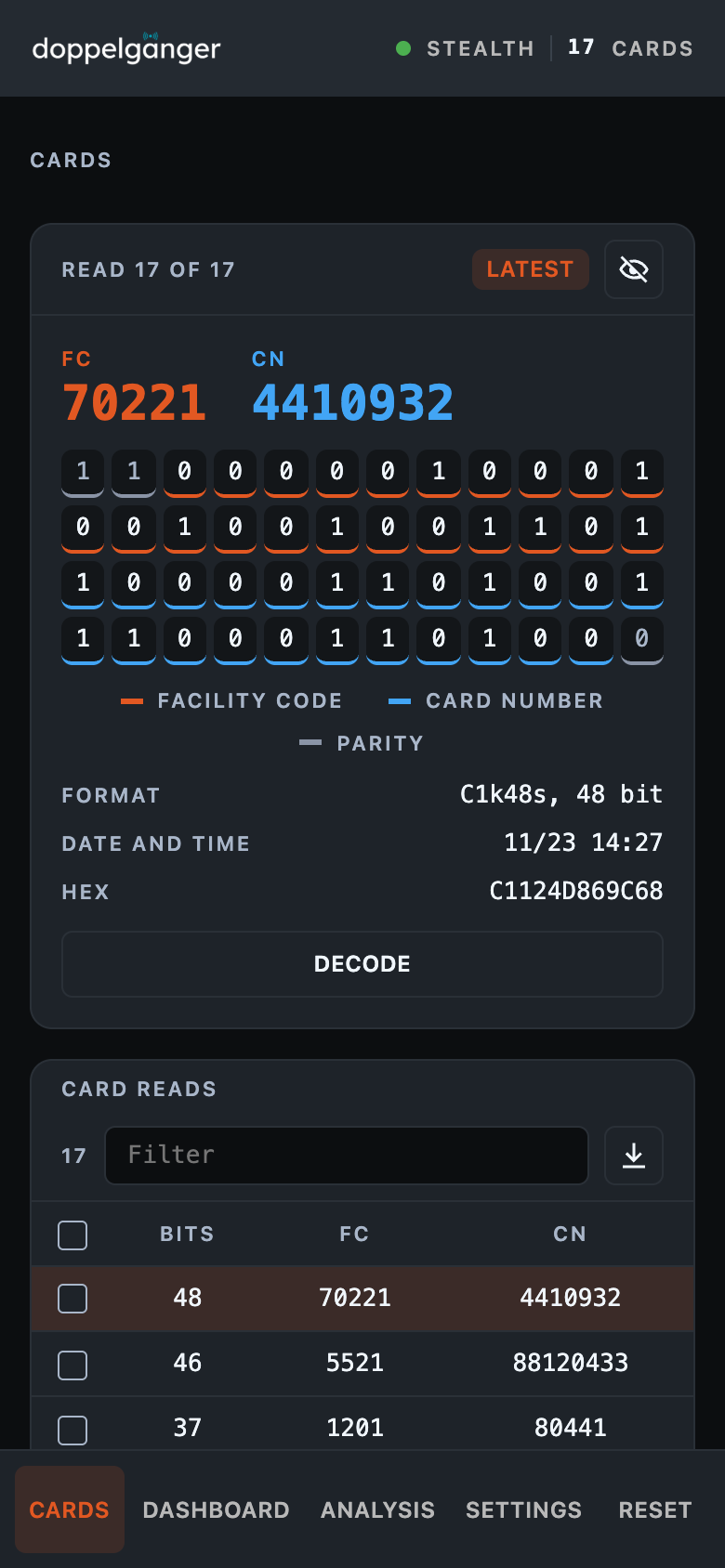
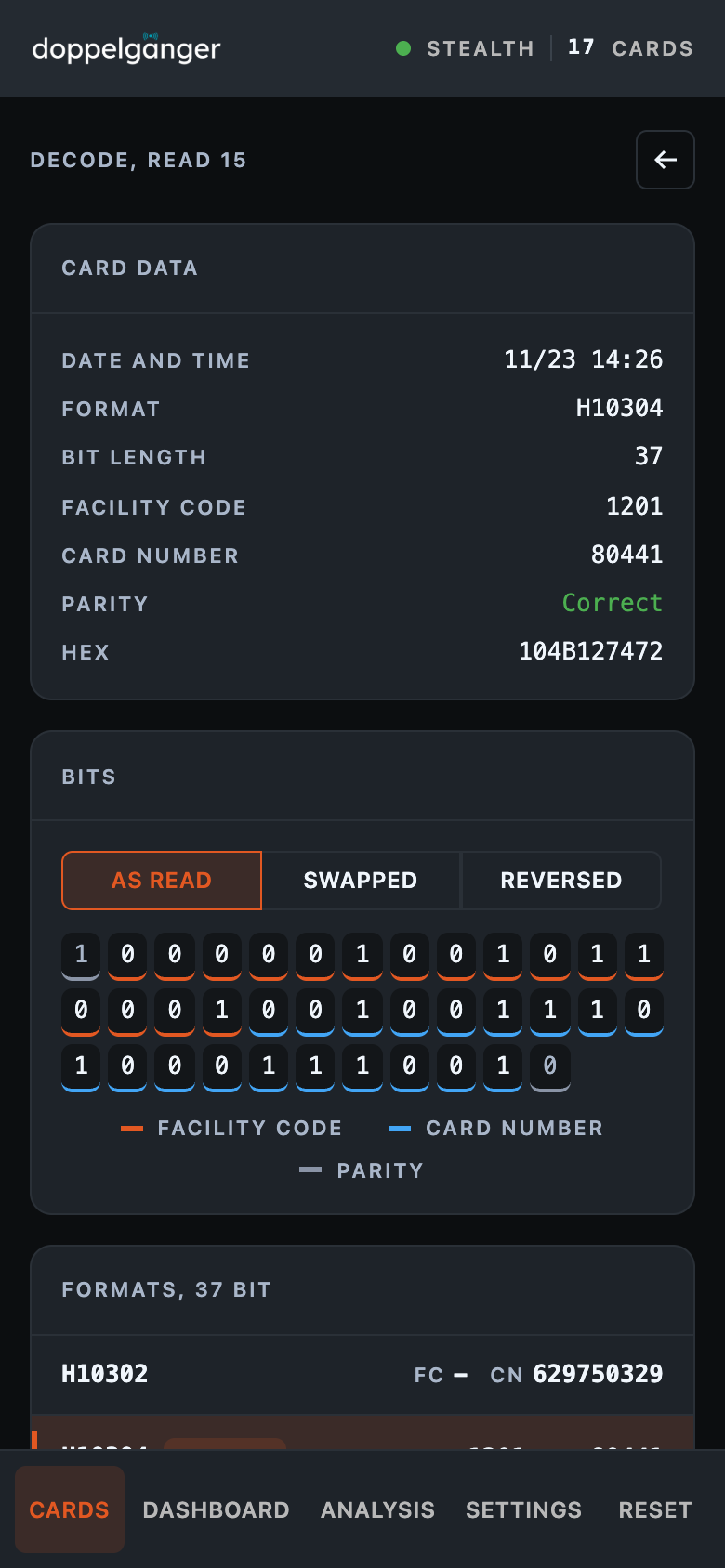
- FC and CN, the facility code and card number of the newest read.
- FORMAT, the format the board named and the bit length.
- DECODE opens the read in full.
- CARD READS, every stored read in order, with a filter and a download control.
- FORMAT, with BIT LENGTH, FACILITY CODE and CARD NUMBER under it.
- PARITY, which reads Correct when the check bits fit the format.
- AS READ, SWAPPED and REVERSED turn the same bits another way.
- FORMATS, every other format of this length and what the read is as each.
- On a phone or laptop, join the reader’s WiFi network. Out of the box it is
doppelgänger_XXXX, whereXXXXis the last four hex digits of the reader’s MAC, and the password isUndertheRadar. - A phone will report that the network has no internet. Stay connected.
- Open
http://192.168.4.1, orhttp://rfid.localwhere the device resolves that name. The page needs no app and no login. - Cards lists everything the reader has stored, in the order it was taken. Tap a card, then DECODE, for its hex, its bits and every other format of the same length.
- Use the download control beside the filter to save the list as a file.
- When everything is safely off the reader, open Reset and tap ERASE STORED CARD DATA.
The network name and password are published, so change both under Settings, Wireless Credentials before the reader goes on a wall. Every tab, setting and button on the page is documented on Stealth Firmware.
In Doppelgänger ATLAS
ATLAS connects to the reader over Bluetooth or WiFi. The reader’s card in the app shows what it is holding as two counts, for example 14 CARDS and 4 PINS, and IMPORT brings both across into the card database under a project. An import copies, so the reader still holds them until you run WIPE ALL CARDS under CONFIGURE.
While ATLAS is connected it raises Card Captured when a badge is read and PIN Captured when a sequence is finished, one notification for the whole PIN and not one for each key. Alert Sound and Vibration Alerts both ship on, under Settings, Capture Alerts. Your phone is in your pocket, feet from the person who just typed a PIN, so decide which of the two you want before the reader goes up.
Connecting over WiFi and setting up the Bluetooth link are the same as on a Stealth, and are laid out under In Doppelgänger ATLAS on the Stealth page.
The cards it acts on
None of these is stored as a capture.
| Card | On an HID reader, from the factory | On a Paxton reader, from the factory | What presenting it does |
|---|---|---|---|
| Stealth card | 26 bit, facility code 222, card number 1337 | 0000001337 | turns the reader’s radios off, and on again |
| Reset card | 35 bit, facility code 111, card number 4444 | 0000004444 | a full factory reset. Every setting goes, the network name and password return to the factory values, and every phone paired from ATLAS is removed. Captured cards and PINs are kept. It works in stealth mode |
| Pairing card | none until you choose one in ATLAS | none until you choose one in ATLAS | used by ATLAS to pair a phone with the reader |
The factory values are published. Set the stealth card and the reset card to values the site will never present before the reader is mounted, on the reader’s own page under Settings, in Stealth Card Settings and Reset Card Settings, or in ATLAS. No card can be set to the value of another.
Firmware
An MFAS runs Doppelgänger Stealth firmware, which captures keypad entries whenever the reader on the front has a keypad. It is installed and updated from Doppelgänger ATLAS or from the browser flasher on a computer, and an update keeps the reader’s settings and everything it has captured.
The steps for each way are on Flashing and Updating.
Intended use
PPE products are professional tools for security practitioners working under contract or in the course of their employment, with the authorization of the site's owner. They are used to perform security audits, to help integrators confirm that an installation is secure, and to audit the work integrators and installers have done, so that flaws are found and remediated before someone with bad intentions finds them. They are not research devices, they are not sold as research devices, and they are not for any illegal or unauthorized purpose.
The manufacturers whose readers and credentials these products are used with make very secure products when those products are implemented properly. An audit shows where an installation falls short of that, so it can be corrected.